
Should You Get a 60W CO2 Laser Engraver?
Buying a laser engraving machine is a significant investment, and one of the most common questions people ask is whether a 60W CO₂ laser is worth the extra cost over smaller desktop machines.
If you ask most people, they would agree that a 60W CO2 laser engraver is the absolute "sweet spot" for small business production and heavy hobbyist use. But this is the sort of general advice that people give, and it is true, but it lacks context and specifics.
A 60W CO2 laser is a versatile mid-tier laser engraving machine, and it is excellent for detailed engraving, etching, and cutting thin to medium materials. What makes 60W CO2 laser engravers so appealing is that they balance affordability and capability, and they are the perfect match (in terms of size and capacity) for hobbyists and small business owners.
 Who Is a 60W CO2 Laser Engraver Best For?
If you are working on wood laser engraving projects, leather, or clear acrylic on a commercial scale, you need a 60W CO2 laser engraver. 60W CO2 laser engravers are the traditional workhorse for craft shops and small businesses, and unlike diode lasers, CO₂ lasers can cut clear, translucent, or blue acrylic seamlessly.
One thing to know about 60W CO2 lasers is that they are made for medium- to larger-scale commercial production. If you are new to laser engraving, it is not ideal to invest in a 60W CO2 laser for two reasons:
- You would have invested in a large-capacity machine that will remain largely unused.
- If business does not go well, you will lose a lot of money, which you may not be able to get back.
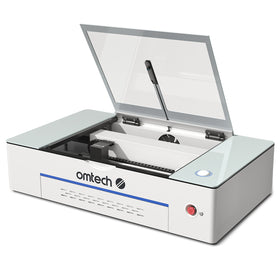
For a beginner, it is always wiser to get a desktop laser engraving machine, specifically a more affordable, beginner-friendly model like the OMTech K40+ 45W Desktop CO2 Laser Engraver (currently at £559.99).
Should You Buy a CO2 Laser Engraver?
At OMTech, we counsel entrepreneurs that, when it comes to 60W CO2 laser engravers, your purchasing decision should be driven by a need to scale. When orders start piling up consistently and you need a boost in capacity to meet demand, you can consider a 60W CO2 laser engraver.
While entry-level lasers are excellent for learning the basics, there comes a point where limited cutting power, slower production speeds, and smaller work areas begin holding projects (and businesses) back
So, most people who get 60W CO2 lasers have already been in laser engraving for some time, have already achieved some success at a beginner level, and are looking to scale their businesses by increasing production capacity.

What Can a 60W CO2 Laser Engraver Do?
In terms of raw technical capacity, a 60W CO2 laser engraver operates with a maximum cutting thickness of about 8mm to 10mm (3/8") for soft materials, an engraving speed up to 600–1000 mm/s, and a cutting speed ranging between 1 mm/s and 40 mm/s depending entirely on the material's density.
It mainly balances two main controls: Speed (how fast the laser head moves) and Power (the percentage of the 60 watts being used).
1. 60W CO2 Laser Engraver Cutting Capacity (Speed and Power)
When cutting completely through a material, the laser needs to move slowly so the beam has time to melt or vaporize the object. A 60W laser requires higher power (65%–85%) and lower speeds for cutting.
- 3mm (1/8") wood or acrylic: Cuts very quickly in a single pass. Typical Settings: 60%–70% power at 15–20 mm/s.
- 6mm (1/4") wood or acrylic: Slices cleanly in a single pass, but moves more slowly. Typical settings: 75%–85% power at 5–8 mm/s.
- 10mm (3/8") thick materials: This is the absolute limit. It moves at a crawl and often requires a second pass, which can cause charred or melted edges. Typical Settings: 85% power at 1–2 mm/s (2 passes).
2. 60W CO2 Laser Engraver Cutting Capacity (Speed and Power)
When engraving (etching a design onto the surface), the laser head zips back and forth incredibly fast. Because it moves so fast, it needs much less power (10%–30%), so it doesn't burn too deep.
- Wood and leather: Shaves off just the top layer to leave a dark, crisp mark. Typical Settings: 15%–25% power at a fast 300–500 mm/s.
- Glass and acrylic: Fractures the glass or dulls the acrylic to create a frosty, white appearance. Typical Settings: 10%–20% power at 350–400 mm/s.
- Anodized aluminum: Strips away the colored dye to reveal the bare silver metal underneath. Typical Settings: 20%–30% power at 250–350 mm/s.
60W CO2 Laser Engravers: Summary of Capacity
| Task | Material Thickness | Ideal Power Range | Ideal Speed Range |
| Fine Engraving | Surface only | 10% – 30% | 300 – 600 mm/s |
| Thin Cutting | 3mm (1/8") | 60% – 70% | 15 – 25 mm/s |
| Medium Cutting | 6mm (1/4") | 70% – 80% | 5 – 10 mm/s |
| Max Cutting | 10mm (3/8") | 80% – 85% | 1 – 3 mm/s (Multiple passes) |
What Can a 60W CO2 Laser Not Do? (Power Limits)
- Cut metals: 60W of CO2 power is not concentrated or hot enough to cut through any metals (like steel, aluminum, or copper). You would need a Fiber laser engraver or a CO2 laser with over 150W to do that. The OMTech Pronto 75 150W CO2 Laser Engraver would be more suitable as it features a 1600x1000mm working area, an upgraded system for better performance, autofocus, and engraves at up to 1000mm/s speed.
-
Engrave bare metal directly: A 60W CO2 laser beam will just bounce off raw, shiny stainless steel. To mark it, you must first paint the metal with a chemical spray (like Cermark), let the laser bake the chemical onto the surface, and wash the rest away.
Best 60W CO2 Laser Engravers From OMTech
1. The OMTech Pronto 60W CO2 Laser Engraver
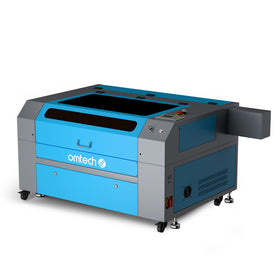
The OMTech Pronto 60W CO2 Laser Engraver is the fastest machine in the Pronto lineup, engraving at up to 1,000 mm/s across a generous 28" x 20" workspace. An autofocus function with a red-dot indicator gets you cutting in seconds, not minutes, while the upgraded V-wheel, belt, and ball-screw transmission delivers razor-sharp results run after run.
This machine is built to keep pace with your production, not slow it down: a turbocharged 318 CFM fan and boosted air pump clear smoke fast, and Class-1 safety features plus real-time temperature monitoring let you run longer with total peace of mind.
Compatible with LightBurn, RDWorks, and CorelLaser, and ready to connect via USB, WiFi, or Ethernet, the Pronto 35 is the upgrade your workshop has been waiting for.
2. OMTech Maker AF2028-60 – 60W CO2 Laser Cutter and Engraver
Big results, small footprint: the OMTech Turbo-646 packs a 60W laser and a sprawling 600x400mm honeycomb and aluminum blade workbed into a machine that's roughly the size of a mini-fridge. Autofocus takes the setup hassle off your plate, so you can go from design to engrave faster than ever.
From glass and stone to wood, leather, and acrylic, this machine handles it all with precision most diode lasers can only dream of, cutting up to 0.4" deep with ease. And with an intuitive digital control panel plus compatibility with LightBurn, RDWorks, and CorelDRAW, it's built to fit right into your existing workflow.
Best of all, you're getting this much power and work area for a fraction of the market price: backed by a 2-year warranty and OMTech's dedicated support team. This is the workhorse your shop has been missing.

What Can You Use a 60W CO2 Laser Engraver For?
A 60W laser engraver produces highly detailed engravings on leather, slate, granite, glass, and anodized aluminum. You can even etch the backs of mirrors to create custom signs. It also easily cuts and engraves paper, cardboard, fabric, and rubber (for stamps).
1. Wood Projects
- Making photo engravings: It can burn highly detailed photographs onto light hardwoods like maple or basswood.
- Layered mandala art: A 60W CO2 laser engraver cuts multiple thin sheets of plywood into intricate geometric shapes. You can then glue them on top of each other for a 3D effect.
- Custom cutting boards: With a 60W CO2 laser engraver, you can engrave family recipes, names, or designs into bamboo or walnut boards.
- Custom geometric boxes: Cut flat panels with interlocking finger joints to snap together jewelry boxes or desk organizers.
2. Acrylic Projects
- Edge-lit LED signs: Engrave a design onto clear cast acrylic and slide it into a slotted LED base to make the design glow.
- Custom keychains and earrings: Cut colorful or glittery acrylic into fun shapes and add engraved details.
- Event signage: Cut out bold lettering for wedding signs, table numbers, or business logos.
3. Leather and Fabric Projects
- Hat patches: Engrave and cut out leather patches to stitch or glue onto trucker hats.
- Personalized wallets: Etch initials or custom artwork into genuine leather wallets and journals.
- Coasters: Cut thick vegetable-tanned leather into circles or squares and stamp them with detailed patterns.
60W CO2 Laser Engravers vs. 60W MOPA Fiber Lasers vs. 60W Diode Laser Engravers
| Laser Type | Primary Materials | Average Price Range | Top Sentiments |
| MOPA Fiber | Bare metals, titanium, steel, aluminum, brass, opaque plastics | $3,500 – $5,000 | Unmatched speed on metals; color marking capability on steel is excellent. |
| CO₂ Enclosed | Wood, leather, glass, all colors of acrylic | $2,000 – $3,500 | Essential for acrylic fabrication; requires a water chiller and mirror alignment. |
| Diode Gantry | Wood, leather, dark acrylic, dark anodized metal | $1,200 – $1,900 | High cutting power for the price, but cannot cut clear acrylic or engrave bare metal. |
1. 60W MOPA Fiber Lasers (Best for Metals and Plastics)
If you want to engrave deep into metal, engrave firearms, or etch detailed text on metal tumblers, a 60W MOPA fiber laser is what you need. The MOPA source gives you advanced control over pulse frequency, allowing you to create beautiful colored engravings on stainless steel and titanium.
The advantage of a 60W MOPA fiber laser is that it easily eats through thick metal sheets or creates 3D depth in brass coins, and it can handle high-volume industrial tasks without sweating.

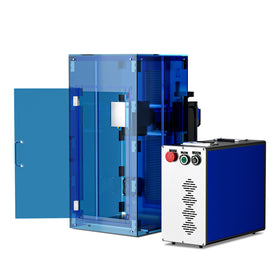
OMTech’s MOPA 60W Split Fiber Laser Engraver features a 6.9" x 6.9" working area and a powerful 60W output combined with high-speed engraving at 10,000mm/s. You can easily handle small to medium projects, cater to various creative needs, and allow your imagination to flourish.
Whether it's brass, carbide, granite, stainless steel, metal, or plastic, this 60W fiber laser easily handles all materials, fulfilling your DIY needs and enabling you to create unique crafts.
2. 60W Diode Lasers (Best for Budget and Large Footprints)
60W diode laser engravers have high-power multi-diode modules that bundle multiple smaller laser beams into one powerhouse. The appeal of 60W diode laser engravers is that they are much more affordable and compact than CO₂ machines, but a major downside with them is that they cannot easily cut clear acrylic.
So, you mainly go for a diode laser if you are on a budget, and you want a heavy-duty laser engraver for deep cutting (plywood, acrylic, etc), and engraving intricate designs on wood, leather, slate, and coated materials.
Three Rules of Thumb For Buying a 60W CO2 Laser Engraver
- Budget for LightBurn software: Skip the free, clunky software. Budget £88.79 roughly for a LightBurn Software License. It is the universal industry standard used by many others for CO₂, fiber, and diode setups.
- Do not skimp on ventilation: A 60W laser cuts fast, meaning it creates heavy smoke and toxic fumes quickly. Buy an inline fan (6-inch minimum) to dump fumes outside, or purchase a multi-stage dedicated smoke purifier.
- Cooling equals longevity: For CO₂ setups, keeping the tube cold preserves its life. While an aquarium pump in a bucket of ice water works for budget hobbyists, investing in a refrigerated water chiller (like a CW-5200) protects your investment long-term.
 Final Thoughts On Getting a 60W CO2 Laser Engraver
A 60W CO₂ laser engraver is one of the most versatile machines you can buy if your workload has outgrown an entry-level system. It offers the speed, power, and working area needed to produce professional-quality wood, acrylic, leather, glass, and other non-metal projects while remaining far more affordable than industrial laser systems.
That said, bigger is not always better. If you're just beginning your laser engraving journey or only create occasional personal projects, a smaller machine may provide better value.
However, if customer orders are increasing, production time has become a bottleneck, or you need to work with larger materials and thicker stock, upgrading to a 60W CO₂ laser can be one of the most worthwhile investments you make for your business.
You may also be interested in how to choose a laser engraver and explore some tips you may need to make your final decision.