Not Every Popular Laser Engraver Is Worth the Money
A Practical Guide for Makers, Sign Shops, Schools and Small Workshops
A machine that works well for a hobbyist engraving photos onto pine boards may not be suitable for a small business running orders five days a week. The specifications may look similar, but the real-world results can be very different.
The right laser engraver depends on what you make, what materials you use, how often you produce, and whether the machine needs to support a business, a school workshop, or a home studio.
Here’s how UK buyers should think about choosing the best laser engraver by application.

Best Laser Engraver for Wood
Wood is one of the most common materials for laser engraving.
Popular applications include:
- Personalised gifts
- Chopping boards
- Wooden signs
- Box lids
- Craft products
- Home décor
- Furniture details
For wood, a CO₂ laser is usually the best choice.
CO₂ laser beams are absorbed well by organic materials, allowing for clean engraving, sharp detail, and reliable cutting performance.
For light hobby use, a 40W to 60W machine may be enough.
However, if you are selling on Etsy, attending craft fairs, or running regular customer orders, a smaller machine may quickly feel slow. Jobs can stack up, turnaround times increase, and production becomes frustrating.
A 60W CO₂ laser is a practical starting point for many small UK businesses working with wood. It offers enough power for real production while remaining manageable for smaller workshops.
For higher output, stepping up to an 80W or 100W CO₂ laser can significantly improve cutting speed and daily productivity.
Best CO₂ Laser Engraver for Mixed Materials
CO₂ lasers are not limited to wood.
They can also process:
- Acrylic
- Leather
- Rubber
- Card
- Fabric
- Glass with the right setup
This makes them especially useful for UK sign makers, gift businesses, schools, design studios and small manufacturers.
A sign shop, for example, may need to cut acrylic letters in the morning, engrave wooden plaques in the afternoon, and produce leather tags later the same day.
That flexibility is why CO₂ machines remain one of the most popular laser choices for non-metal materials.
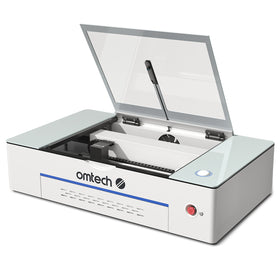
For smaller workspaces, a compact desktop CO₂ laser can be suitable.
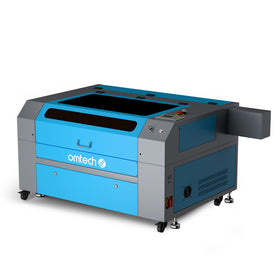
For regular business use, a cabinet-style CO₂ laser with a larger work area is often the better investment.
The key is matching the bed size and power level to your workload. A larger table allows you to process bigger sheets, batch more products, and reduce setup time.
Best Fibre Laser Engraver for Metal
Fibre lasers are a completely different category.
They are not designed for cutting wood or acrylic.
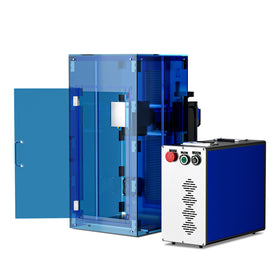
They are built for marking metal.
A fibre laser is ideal for:
- Stainless steel
- Aluminium
- Brass
- Copper
- Titanium
- Jewellery
- Tools
- Machine parts
- Metal tags
For businesses that need permanent marks on bare metal, fibre is usually the correct choice.
Typical users include:
- Engineering workshops
- Jewellery makers
- Tool suppliers
- Metal fabricators
- Product manufacturers
- Promotional product companies
Fibre lasers create durable, high-contrast marks without paint, chemicals or coatings.
For small workshops, a 20W to 30W fibre laser is often a strong entry point. For faster marking, harder metals, or higher production volume, a 50W fibre system may be more suitable.

Best Laser Engraver for Small Business
This question is often answered too simply.
There is no single “best laser engraver for small business”.
A one-person gift shop producing ten orders per week has very different needs from a sign company producing dozens of custom pieces per day.
For low to moderate volume custom work, a 60W CO₂ laser is often a sensible starting point.
For daily production, an 80W to 100W CO₂ laser provides more speed and flexibility.
For metal marking, a fibre laser is the better choice.
Before buying, ask:
- What materials will I use most?
- How large are my products?
- How many orders do I expect per week?
- Do I need cutting, engraving, or metal marking?
- Will I need room to grow?
The best machine is not always the cheapest one.
It is the one that supports your actual workload.
Best Laser Engraver for Beginners
Many beginners are told to start with the cheapest machine possible.
That is not always good advice.
If you are buying purely for occasional hobby use, a small entry-level machine may be fine.
But if you plan to start a business, buying too small can become expensive quickly.
You may outgrow the machine within months and need to upgrade sooner than expected.
A better approach is to buy the smallest machine that can comfortably handle your real projects.
For beginners working with wood, acrylic and gifts, a 60W CO₂ laser offers a good balance of capability and accessibility.
For beginners focused on metal marking, a 20W or 30W fibre laser is a more appropriate starting point.

Do Not Forget Ventilation and Safety
UK buyers should also think beyond the machine itself.
Laser engraving produces smoke, fumes and odours depending on the material.
A proper setup should include:
- Effective extraction
- Good ventilation
- Suitable filtration if required
- Safe material selection
- Regular lens and mirror cleaning
Never cut unknown plastics or PVC, as some materials can release dangerous fumes.
Schools, colleges and shared workspaces should also consider training, supervision, and safe operating procedures before installation.
Software Matters More Than Many Buyers Realise
Good software can make a major difference to daily use.
Many OMTech CO₂ laser engravers are compatible with LightBurn, a popular laser control software used by hobbyists, schools and businesses.
Software affects how easily you can:
- Import files
- Set cutting and engraving layers
- Adjust power and speed
- Preview jobs
- Manage repeat orders
For small businesses, easier software means faster production and fewer mistakes.
What “Best” Really Means
The best laser engraver for wood is not the best laser engraver for metal.
The best machine for a beginner may not be the best machine for a busy workshop.
The best choice depends on:
- Material compatibility
- Work area size
- Laser power
- Production volume
- Software support
- Maintenance access
- Customer support
Online rankings can be useful, but they rarely understand your specific workflow.
A better question is not:
“What is the best laser engraver?”
It is:
“What is the best laser engraver for the work I need to do?”
Why OMTech Is a Practical Choice for UK Buyers
OMTech laser machines are designed to support a wide range of users, from home-based makers to growing businesses and educational workshops.
With options including CO₂ laser engravers, fibre laser marking machines and compact desktop systems, OMTech provides solutions for:
- Wood engraving
- Acrylic cutting
- Sign making
- Personalised gifts
- Metal marking
- Educational projects
- Small business production
For UK users, the ability to choose from different machine sizes and power levels makes it easier to match the machine to the job rather than overpaying for features you do not need.
The best laser engraver is not the one with the most impressive online ranking.
It is the one that fits your materials, workspace, production needs and business goals.
For wood, acrylic and general custom products, CO₂ lasers remain the most versatile choice.
For bare metal marking, fibre lasers are the better solution.
For beginners, the smartest investment is not always the cheapest machine, but the one that gives you enough capability to grow.
Choose based on real work, not just specifications.
That is how you buy a laser engraver that continues to serve your business long after the first few projects are finished.