4 Things To Look For In a Laser Engraver
If there is a word that best describes how it feels when buying a laser engraving machine, it is probably “overwhelming”. Between laser types, wattage ratings, software compatibility, and safety features, it's easy to get lost in specs before you've even figured out what you actually need.
The good news is that most of the decision comes down to just a handful of factors. Get these right, and you'll end up with a machine that matches your materials, your budget, and your skill level instead of one you outgrow in a month or regret buying at all. Here are the four things to look for before you buy your first laser engraver.

Step#1. Match the Laser Type to Your Target Material
When it comes to buying a laser engraver, the very first thing to keep in mind is that you must match the type of laser engraver to the material you plan to engrave. There is no single laser engraver that can engrave every material, and each of the different types of laser engravers is optimized for different materials (wood, metal, acrylic, etc.).
So, the type of laser engraver you choose will determine what kinds of materials you can work on.
1. Diode Laser Engravers: Best For Wood, Leather, and Non-Metal Materials
A diode laser engraver uses semiconductor laser diodes to produce a focused beam of light, and it is ideal if you have limited workspace or budget and primarily work with non-metal materials.
Diode lasers are best used for engraving wood, leather, paper, slate, and dark acrylic, and because they are the most affordable type of laser engraver, they are a favorite among beginners, DIY enthusiasts, makers, Etsy sellers, small business owners, and even educators.
However, the drawback with diode lasers is that they cannot cut other types of acrylic (clear, blue) and cannot engrave bare metals unless you use a specialized marking spray.
Consider Dual Diode Laser Engravers For Wood and Metal
But here is where advanced models like OMTech’s Solis Duo laser engravers come in. OMTech Solis Duo Laser engravers are hybrid diode laser engravers that combine fiber and diode technology, giving you the flexibility to engrave metal, wood, and more, all in a single machine.
With an OMTech Solis Duo, you overcome the usual limitations of diode laser engravers with the help of the attached fiber laser engraver, allowing you to vastly expand your engraving materials from wood to metal and more.

Consider the OMTech Solis Duo 30W Fiber & 20W Diode Dual Laser Engraver, a versatile, affordable dual laser engraver for wood and metal that allows you to engrave wood, gold, acrylic, leather, stainless steel, copper, glass, and more with ease. It is equipped with a 16 MP HD camera and 10" x 10" & 5.9" x 5.9" processing areas, and is capable of capturing multiple targets at once. Finish larger projects faster and deliver exceptional results every time.
Designed for crafters, small businesses, and DIY enthusiasts, it opens the door to endless possibilities: from jewelry and signage to home décor and custom gifts.
Should You Get a Diode Laser Engraver?
If you plan to cut through thick materials or engrave metals, it's better to consider other alternatives. But if your budget is limited, you have limited experience in laser engraving, or you're doing this as a hobby, a diode laser engraver will serve you best.
 2. CO2 Laser Engravers
A CO₂ laser engraver uses a carbon dioxide gas laser to produce a powerful infrared beam. Where a CO2 laser excels is engraving and cutting non-metal materials like wood, acrylic, leather, glass, rubber, fabric, paper, and stone, which is what makes them the standard for small businesses and serious hobbyists.
Compared to diode lasers, CO₂ lasers generally offer faster speeds, cleaner cuts, and can process thicker materials. It's worth noting that CO2 laser engravers are one of the few types that can cut clear acrylic and can engrave directly onto glass and clear acrylic.
CO₂ laser engravers provide high-quality engraving and cutting across a wide range of non-metal materials, which is why they're best suited for small businesses, professional makers, sign shops, schools, and production workshops.
CO2 Laser Engravers: Types and Options
When you are looking to buy a CO2 laser engraving machine, it always helps to understand that there are three main types of CO2 laser machines: desktop CO2 laser engravers, K40 style CO2 laser engravers, and large-format (freestanding) CO2 laser engravers.
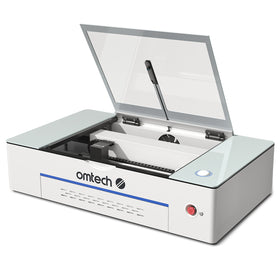
- Desktop CO2 laser engravers: These are compact all-in-one machines designed for small spaces, lower wattages, and user-friendly software integration. They usually range from 40-55W and are best if you have limited space. Consider the OMTech Polar Desktop series, which contains beginner-friendly desktop CO2 laser engravers, but with enough size and capacity for you to start a business with.
- K40 CO2 laser engravers: These are cheap, entry-level 40W CO2 laser engravers that require manual tweaking, safety upgrades, and external venting. These are best if you are on a very tight budget, and you are mostly getting into laser engraving as a hobby-at least in the short term. Consider the OMTech K40 Desktop laser engraving machine, a K40+ 45W Desktop CO2 Laser Engraver with a 8" x 12" working area and detachable honeycomb workbed
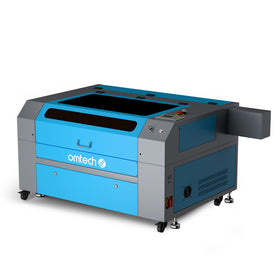
- Large Format / Industrial CO2 Laser Engravers: These are heavy-duty floor-standing production units (like Thunder Laser or Aeon Mira) built for speed, heavy wood/acrylic cutting, and changeable lenses. Consider the OMTech Pronto Laser Engraver Series, which has models that engrave at 1000mm/s – 37% faster than competitors and come with upgraded transmission systems for superior accuracy in every detail.

Should You Get a CO2 Laser Engraver?
If you intend to get into laser engraving or cutting non-metal materials on a commercial level, then a CO2 laser is the ideal choice for your first laser engraver. With a CO2 laser engraver, you can start building skills and creating products like custom signage, home décor, personalized gifts, packaging, and promotional items while familiarizing yourself with the intricacies of the laser engraving industry.
The only drawback with CO2 lasers is that they're not ideal for metal. Some CO₂ lasers can mark coated or treated metals, but if you plan to primarily engrave bare metals, you'll be better served by a fiber laser engraver.
3. Fiber/Infrared Lasers
Fiber laser engravers are built strictly for engraving or cutting bare metals (aluminum, brass, stainless steel) and hard plastics. A fiber laser engraver should only be your top choice if you primarily work with metal. They excel at deep engraving and creating high-detail imagery on tumblers and jewelry.

Fiber Laser Engravers: Types and Options For Buyers
Fiber laser engravers are generally classified according to their core laser sources: Q-switched fiber and MOPA fiber lasers. Fiber laser engravers in these two categories differ in price, function, and best use, and these differences are very important if you are buying a fiber laser for the first time.
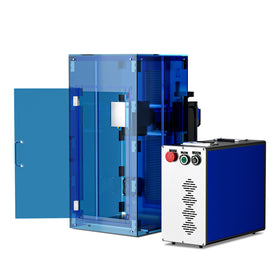
- Q-Switched (Standard Fiber): Q-switch fiber laser engravers are the traditional, budget-friendly choice. A standard fiber laser has fixed pulse durations, is easy to learn, and works well for basic metal marking, serial numbers, and deep engraving. Consider the OMTech Galvo Autofocus laser engravers with an MTTF of over 100,000 hours and wide application from stainless steel and gold to hard plastics and more.
- MOPA (Master Oscillator Power Amplifier): MOPA fiber lasers offer adjustable pulse widths and a wider frequency range than regular standard Q-switched fiber laser engravers. One important thing to note for new buyers is that they cost more and have a steeper learning curve, but MOPA fiber lasers allow for fine contrast adjustments and marking colors on stainless steel.
 OMTech MOPA fiber lasers allow you to metal engrave color images and patterns onto materials like stainless steel and titanium. You can adjust heat input precisely, unlocking a magnificent spectrum of permanent colors on stainless steel and flawless, high-contrast black marking on anodized aluminum.
Should You Get a Fiber Laser Engraver?
Consider a fiber laser engraver if you're a gun customizer or need to engrave deep logos, serial tags, and intricate details on stainless steel, titanium, brass, aluminum, and precious metals.
This is why fiber laser engravers are used by jewelry makers, machine shops, manufacturers, gunsmiths, automotive businesses, electronics companies, and professional engraving businesses.
4. UV Laser Engravers
A UV laser engraver is a laser marking machine that uses an ultraviolet laser beam with a very short wavelength to create precise, high-contrast markings with minimal heat. This "cold marking" process reduces the risk of burning, melting, or cracking delicate materials, making UV lasers ideal for engraving glass, crystal, ceramics, plastics, silicone, electronic components, and certain coated metals.
Should You Buy a UV Laser?
Seriously consider a UV laser engraver if you plan to engage in laser engraving applications that require ultra-fine detail, such as QR codes, serial numbers, logos, and micro-marking.
Keep in mind, though, that while highly versatile for precision engraving, UV lasers are generally not intended for cutting thick materials or high-volume woodworking, where CO₂ or fiber lasers are more appropriate.
Step#2. Choose the Right Laser Power (Wattage)
After deciding on what type of laser engraver you need, the next step is to decide how much power you need. The power of a laser engraver (usually measured in watts) determines how deep the laser can cut and how fast it can engrave.

Laser Engraving Power Chart
| Laser Type | Typical Power Range | Most Common Power | Best For |
| Diode Laser | 5W–40W | 10W–20W | Engraving wood, leather, paper, cardboard, dark acrylic, coated metals; cutting thin wood and acrylic |
| CO₂ Laser | 30W–150W | 50W–100W | Engraving and cutting wood, acrylic, leather, glass, rubber, fabric, paper, and stone |
| Fiber Laser | 20W–100W | 30W–50W | High-speed engraving and marking on stainless steel, aluminum, brass, copper, titanium, gold, silver, and engineering plastics |
| UV Laser | 3W–15W | 5W | Ultra-fine "cold" marking on glass, crystal, ceramics, plastics, silicone, electronics, and coated metals |
Choosing Laser Engraving Power: Diode, CO2, Fiber and UV Lasers
- Most diode laser engravers range from 5W to 40W optical output. The most popular units for hobbyists and small businesses are the 10W–20W models.
- Most CO₂ laser engravers range from 30W to 150W. 40W–55W CO2 lasers are best for beginners, etching glass or leather, and cutting thin wood or acrylic under 1/4 inch.
- Most fiber laser engravers range from 20W to 100W. 20W–30W units handle basic surface marks and are ideal if you're a beginner, while 50W–60W+ MOPA systems are recommended for deep engraving and color-annealing on metal.
- Most UV laser engravers have power ratings between 3W and 15W, with 5W being the most common for commercial and professional systems.
Deciding on Laser Engraving Power: Quick Power Guide
| Power | Typical Use |
| Diode (5W–10W) | Light engraving and occasional cutting |
| Diode (10W–20W) | Best all-around choice for hobbyists and small businesses |
| Diode (30W–40W) | Faster production and thicker material cutting |
| CO₂ (30W–40W) | Light engraving on non-metals |
| CO₂ (50W–80W) | Best balance of engraving, cutting, and value |
| CO₂ (100W–150W) | Commercial and industrial production |
| Fiber (20W) | Fine metal marking and detailed engraving |
| Fiber (30W–50W) | Best balance of speed, precision, and versatility |
| Fiber (60W–100W) | Deep engraving and high-volume industrial work |
| UV (3W–5W) | Precision engraving on delicate materials |
| UV (10W–15W) | Faster marking and higher production throughput |
- Look strictly for the Optical Output Power (measured in Watts), not the "Input Power" or "Machine Power."
- A machine advertised as "40W Machine Power" might only have a 5W or 10W actual laser beam, which will heavily limit your cutting depth and speed.
 Step#3. Ensure Full LightBurn Compatibility
Another important factor to consider when buying a laser engraver is what kinds of software it's compatible with. The consensus in the laser engraving community is that you only buy a laser engraving machine if it's compatible with LightBurn software.
For context, LightBurn is the industry-standard hobbyist and small-business software because it runs locally, doesn't require a constant internet connection, and handles complex files easily.
There are many other kinds of laser engraving software, some of which come bundled with the machine, but they tend to be rather clunky, proprietary, or cloud-based. This is simply inconvenient at best, and a serious limitation at worst.
Advantages of LightBurn Compatibility When Buying Your First Laser Engraver
Beyond day-to-day convenience, LightBurn compatibility matters for a few other reasons worth keeping in mind as a first-time buyer:
- One tool across every future machine: LightBurn works across most major laser brands and controller types (GRBL, Ruida, and others).
- Active community and resources: Because it's the most widely used software in the hobbyist and small-business space, LightBurn has a large user base, extensive tutorials, and active forums..
- No subscription lock-in: LightBurn is a one-time purchase rather than a recurring subscription, and it doesn't require your files or designs to live on a company's cloud server to function.
- Resale value: Machines with confirmed LightBurn support tend to hold their value better on the used market, since buyers know they won't be locked into unfamiliar or discontinued proprietary software.
To make a more informed decision, you might want to explore our guide on LightBurn vs LaserGRBL
 Step#4. Consider Safety Accessories
Many laser engravers look cheap (especially if you're buying online), but they're usually incomplete for safe home use. This is one of the hidden risks of buying a laser engraver: you may buy a unit that's inexpensive, but unsafe to use at home. Consider the following:
- Enclosed vs. open-frame: If you're a beginner or operate out of a shared space, a fully enclosed machine (Class 1 certified) with a filtered lid is highly recommended to block harmful light, smoke, and fumes. Open-frame machines require a dedicated, ventilated workshop and protective eyewear.
- Air assist: Look for models with built-in air assist, which blows a stream of air at the focal point to prevent burning, reduce charring, and clear debris.
- Bed size: Consider the scale of your projects. If you plan to engrave large signs or batch-cut shapes, look for beds of at least 24" x 16". For small crafts, desktop machines around 12" x 8" are fine.
Buying Your First Laser Engraver: Why Choose OMTech?
A good first laser engraver should be easy enough to learn, versatile enough to support different projects, and powerful enough to grow with your skills. OMTech stands out as a strong choice for first-time buyers because it offers reliable machines across multiple categories, making it easy to find the ideal first laser engraver, whether you're a beginner, hobbyist, or small business owner.
Omtech’s Wide Selection of High-Quality CO2, Fiber, and Diode Laser Engravers
One of OMTech's biggest advantages is its wide selection of CO₂, fiber, and specialized laser systems.
- As a beginner, you can start with a compact desktop model like the OMTech Polar Lite 55W, which provides the capabilities needed for engraving and cutting popular materials such as wood, acrylic, leather, and more.
- If you're looking for a first metal laser engraver, OMTech also offers fiber laser solutions, including Galvo and MOPA systems designed for precise marking on materials such as stainless steel, aluminum, and other metals.
- As you gain experience and/or expand into commercial production, you can move up to higher-powered machines in the Pronto, Maker, or Pro series without changing brands.
This gives you an upgrade path if you later expand from wood and acrylic projects into jewelry, tools, industrial parts, or personalized metal products.
OMTech's Best Recommended Laser Engravers for First-Time Buyers
| Machine | Laser Type | Ideal Power | Best For |
| OMTech K40+ | CO₂ | 45W | Absolute beginners on the tightest budget, first-time hobbyists testing the waters |
| OMTech Polar Lite 55W | CO₂ | 55W | Compact home studio use, with a built-in camera and beginner-friendly, guided workflow |
| OMTech Maker Series (e.g., MF1624-60) | CO₂ | 60W | Beginners ready to size up their work area and engraving/cutting speed |
| OMTech Pronto Series | CO₂ | 80W–150W | First-time buyers with small-business ambitions from day one |
| OMTech Fiber (MOPA/Galvo) | Fiber | 20W and up | First-time buyers whose primary material is metal (jewelry, tools, tags) |
Overall, OMTech is a strong choice for first-time laser buyers because it combines accessible entry-level machines, professional-grade upgrade options, broad material compatibility, and a product lineup that can support users from their first engraving project to a full-scale laser business.
Whether you're a hobbyist exploring a new craft or an entrepreneur building a custom product business, OMTech offers machines that can grow alongside your skills and ambitions.
 Final Thoughts on Buying Your First Laser Engraver
Buying your first laser engraver comes down to knowing your materials, your budget, and how much room you have to grow. Start by matching the laser type to what you actually plan to make; there's no point paying for metal-cutting power if you're only ever going to engrave wood and leather, and no diode laser will get you through clear acrylic or stainless steel.
From there, wattage and safety features narrow the field further, while LightBurn compatibility protects the investment you're making, since it keeps you free to add machines, learn new skills, and sell your work without fighting proprietary software along the way.
The good news is that you don't have to get every decision perfect on your first purchase. A well-chosen entry-level machine, like the OMTech Polar Lite or K40+, gives you room to build real skills and figure out what you actually enjoy making, and OMTech's broader lineup means you can move up to a higher-powered CO2, fiber, or specialized system later without starting your learning curve over from scratch.
You may also be interested in why you should never buy a cheap laser engraver, and more tips you need as you explore all your options with OMTech.