Best Laser Engraver for Etsy Sellers
If you have spent any time researching what the best laser engraver is for your Etsy business, you have probably come across the same advice over and over again: there is no single "best" machine. Instead, you must choose a laser engraver based on the primary materials you plan to work with (typically a diode laser for wood, leather, and dark acrylic, or a CO₂ laser if you intend to cut clear acrylic or work with a wider range of materials).
There is no doubt that this advice is useful, but doesn't go far enough. Knowing the type of laser you need is only part of the decision. It doesn't help you determine which specific machine fits your products, workspace, production goals, or budget.

Buying a Laser Engraver For Etsy Business: 4 Questions to Help You Decide
To decide which laser engraver is best for your Etsy business, or any small business, you must ask four very important questions:
- What specific items or materials (wood, clear acrylic, leather, glass, metal) do I plan to sell?
- Do I plan to do more cutting or engraving?
- What is my total Budget, including safety gear and ventilation?
- Do I have a dedicated workshop space, or will this operate in a home/apartment?
These four questions are pivotal when choosing a laser engraver for a small business because they help you decide what type of laser engraver you need, and which specific model will fit into your budget while being the best practical option to operate within the amount of space you have available.
This is the best way to choose a laser engraving machine if you are launching a small business on Etsy or otherwise.
Question#1. What Specific Items or Material Do You Plan To Sell?
When buying a laser engraver for a small business, the first question you must ask yourself is: “What items or materials do I plan to sell”? This is very important because the specific material you choose to engrave or cut dictates the wavelength of the laser you need.
For context, every laser engraver operates at a specific wavelength, and different materials respond differently to those wavelengths. The wrong laser type on certain materials will either result in zero marks, toxic fumes, or an immediate fire hazard.
The smart approach here is to choose the laser engraver type that is best compatible with one or two materials that will make up 80% of your products.

1. Wood and Leather
-
Best Choice: Affordable Diode and CO2 laser engravers
In general, both diode lasers and CO2 lasers excel for engraving wood and leather: natural organic materials absorb both wavelengths perfectly.
If you are just starting your Etsy shop with wood ornaments, wallets, wooden signs, or leather patches, a Diode laser (like xTool S1) is highly affordable and delivers extremely sharp engraving details.
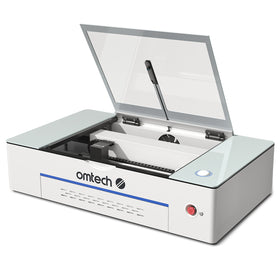
If you need to batch-produce hundreds of items quickly, a CO2 laser engraver (like the OMTech Polar Lite Desktop CO2 Laser Engraver) is better because it cuts through thick plywood much faster and is much better suited for batch production.
2. Clear and Light-Colored Acrylics
- Best Choice: CO2 Laser engraver
CO2 laser engravers work best for light-colored acrylics because they use a blue light spectrum (about 450nm) that passes straight through clear, white, pink, or light blue acrylic like a window, failing to cut or engrave it.
For context, a CO2 laser would not be the ideal choice: they use a much longer wavelength (10,600nm) that the plastic fully absorbs, allowing it to slice through clear acrylic like butter, leaving a flame-polished edge.
An important Tip:
Note that Diode lasers can only cut dark, opaque acrylics like black or dark green. So, if your Etsy store relies on clear wedding signage, personalized nightlights, or pastel-colored keychains, you must buy a CO2 laser. An entry-level diode will leave you frustrated and wasting material.
3. Glass
-
Best Choice: CO2 Laser (or Diode with a workaround)
Like clear acrylic, a diode laser's beam will pass right through clear glass. A CO2 laser is much better because it engraves directly onto raw glass instantly and creates a beautiful frosted look.
You can technically go for a diode laser, but you will have to first coat the glass in black laser tempera paint, dish soap, or painter's tape so the beam has something to hit, and then wash it off afterward.
If you plan to sell high volumes of custom bridal wine glasses or etched beer mugs in your Etsy shop, the manual prep and cleanup time required by a diode laser will kill your profit margins. Go with a CO2 laser for direct-to-glass efficiency.

4. Bare Metals (Gold, Silver, Stainless Steel, Brass)
-
Best Choice: Fiber Laser (or Infrared)
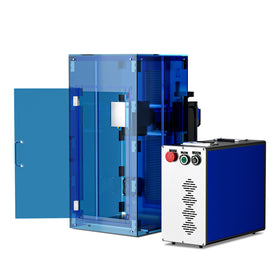
To permanently engrave or deeply carve raw metals, jewelry, and coins, you need a Fiber laser (1064nm wavelength). For personalized metal jewelry, flask engraving, or custom metal dog tags, look into a dedicated fiber desktop unit or a dual-wavelength machine (like the OMTech Solis Duo, which combines fiber and diode).
Keep in mind that diode and CO2 lasers cannot engrave bare metal; they can only engrave coated metals (like anodized aluminum or painted tumblers) by burning away the paint layer.
Question #2: Do you plan to Do More Cutting or Engraving?
Whether you plan to do more cutting (slicing shapes out of sheets) or engraving (etching designs onto surfaces) plays a very important role because it determines the laser power (wattage) and the motion system you need.
Now, most modern laser engraving machines can do a bit of both; but the truth is, they are usually optimized for one specific task. It would be a mistake to buy a laser engraver optimized for engraving and then use it for laser cutting: production times can be very slow, and some of your inventory may be scorched or ruined.
 If You Primarily Want to Engrave (Etching Designs onto Surfaces)
For laser engraving, you need a smaller, tightly focused laser spot size and a machine built for high-speed movement. Engraving requires speed, precision, and rapid pulsing rather than brute power. The laser head must zip back and forth thousands of times to "print" an image.
High wattage is actually a disadvantage here; a 60W CO2 laser, for example, usually cannot drop its power low enough to lightly etch delicate leather or paper without burning right through it.
Essential Machine Features for Laser Engraving
- Galvo vs. Gantry: Standard "gantry" lasers move the entire laser head on rails, capping engraving speeds. "Galvo" lasers (like the OMTech Galvo fiber laser engravers) use high-speed motorized mirrors to deflect the beam, engraving up to 10 times faster.
- Rotary Attachment Compatibility: If your Etsy shop is built on engraving insulated tumblers, wine glasses, or baseball bats, you must ensure the machine has a plug-and-play rotary axis.
If your business plan is custom-engraved Stanley tumblers, leather patches, or slate coasters, buying a giant, heavy-duty cutting laser will be overkill. A fast, lower-wattage diode or a specialized Galvo laser will let you finish an item in 30 seconds rather than 10 minutes.
 If You Primarily Want to Cut (Slicing Shapes Out of Sheets)
Laser cutting requires sustained, high-density energy to burn completely through a material in a single pass. You need higher optical wattage (typically 40W to 60W+ for desktop units) and a CO2 laser or a high-powered multi-diode array.
Essential Laser Machine Features for Laser Cutting
- Air Assist: This is a compressor that blows a constant stream of high-pressure air directly at the cutting point. Without it, your wood will catch fire, leave heavy char marks, and ruin the backside of your cuts.
- Honeycomb Bed: A grid-like metal bed that lifts your material off the solid bottom of the laser. This allows the smoke and heat to escape underneath, preventing flashback burns on your Etsy products.
If your Etsy shop sells multi-layered wood signs, intricate cake toppers, or blank jewelry shapes, cutting speed is your primary metric. A lower-powered 10W or 20W diode laser will require multiple, slow passes to cut 1/4-inch plywood, which leaves heavily charred, unappealing edges that require hours of sanding.
Laser Engraver Recommendations by Etsy Business Type
| If your Etsy shop focus is... | Your ideal machine type is... |
| 80% Cutting (Wood shapes, acrylic keychains, thick signage) | CO2 Gantry Laser (40W–60W) |
| 80% Engraving (Tumblers, coasters, flat cutting boards) | Galvo Laser or Enclosed Diode |
| 50% Cut / 50% Engrave (A true hybrid mix of both) | Mid-to-High Power Diode (20W–40W) |
Question#3: What Is Your Budget? (Including Safety Gear and Ventilation)
The number one mistake new Etsy sellers make is spending 100% of their budget on the laser engraver itself: forgetting about practical accessories for ventilation, cooling, software, and safety gear. They are left stuck with an unusable machine.
Your budget is the ultimate deciding factor when buying a laser engraver for any small business, as it determines not only the machine you can buy but also whether you can afford the essential accessories needed to run it safely and efficiently.
To simplify, you can break down the real-world cost of a laser setup into three distinct budget tiers.
Budget Tier 1: The Bootstrapper Budget (£500 – £1,200)
If your budget is £500-£1,200, you can almost entirely rely on open-frame Diode lasers or K40-style desktop laser engravers. However, you can expect to get a highly capable entry-to mid-level diode laser like an Atomstack, Longer, or open-frame xTool D1 Pro 10W/20W.
You also have the option to go for an affordable entry-level K40 desktop CO2 laser engraver like the OMTech K40+ 45W Desktop CO2 Laser Engraver. This machine features a 300x200mm working area, a detachable honeycomb workbed, and provides professional laser performance without the high price tag
This tier is best if you are on a really tight budget or just a hobbyist testing the Etsy waters with wood and leather products.

Hidden Costs to Consider In This Tier
- Enclosure (£100–£200): You must buy or build a zippered, fire-resistant tent enclosure to trap the fumes.
- Inline Duct Fan (£50–£100): A strong fan (like an AC Infinity) to pull the smoke through a tube and push it out a nearby window.
Budget Tier 2: The Serious Side-Hustle Budget (£1,500 – £3,000)
A budget of $1,500-$3,000 is the "sweet spot" for most successful Etsy startups. You can get a professional-grade Enclosed Diode or an entry-level commercial-grade Desktop CO2 laser.
Machines you can get: A fully enclosed, plug-and-play machine like the xTool S1 (20W/40W) or a desktop CO2 like the OMTech Polar Lite 55 Desktop Laser Engraver. The Polar Lite is an ideal CO2 laser option in this category: in addition to its 55W laser power, it features a large 500x300 mm workspace, engraves up to a maximum speed of 500 mm/s, and comes with an inbuilt water cooling system.
It is also rotary axis compatible, giving you unlimited options on the shapes and structures of objects you can engrave on.

The Hidden Costs in this Tier:
- LightBurn Software (£60–£120): The industry-standard software. Most machines in this tier require it to design and run jobs efficiently.
- Rotary Attachment (£150–£300): Necessary if you want to tap into the highly profitable Etsy niche of engraved tumblers and mugs.
Budget Tier 3: The Production Powerhouse Budget ($3,500 – $6,000+)
With a budget of £3,000+, you can get large-format machines like an OMTech 60W–80W, a Mira 7, or a dual-source OMTech Solis-duo. This is the price tier for Etsy sellers ready to launch a full-time business scaling up to dozens of orders a day.
It opens up Cabinet-Style CO2 lasers and High-Speed Galvo systems with massive beds to cut 100 keychains at once, heavy-duty build quality meant to run 8 hours a day, and lightning-fast processing speeds.

The Hidden Costs in this Tier:
- Water Chiller (£300–£500): Industrial CO2 lasers require a dedicated water cooling machine (like a CW-5200) to keep the glass laser tube from overheating and shattering.
- Fume Purifier (£600–£1,200): If you live in an apartment or HOA where you cannot stick a smoking pipe out the window, you need a heavy-duty multi-stage charcoal filter box to clean the air inside.
Buying a Laser Engraver For Business: The 'True Cost' Checklist
Before clicking buy, make sure your final budget reserves funds for this exact stack:
- The Laser Machine (60% to 70% of your total budget)
- Exhaust System (Fan, hoses, window vents)
- Safety Gear (Certified eye protection for your specific laser wavelength)
- Design Software (LightBurn)
- Initial Material Stock (Plywood blanks, acrylic sheets, or tumblers to practice on)
Question#4: Do You Have a Dedicated Workshop Space, or Will This Operate in My Home/Apartment?
Your physical workspace, the nature and amount of it, dictates the form factor, safety requirements, and ventilation strategy of your laser engraver.
Here’s one important factor new buyers often overlook: operating a laser engraver in a shared living space requires an entirely different machine setup than running one in a garage or commercial workshop. Failing to account for your environment is a big mistake; you could end up with toxic fumes in your living room, noise complaints from neighbors, or severe eye hazards for family and pets.

Operating in a Home or Apartment (Shared Living Space)
If your laser will sit in a spare bedroom, office, or dining room, you must buy a Class 1 Enclosed Laser. Open-frame lasers are highly dangerous in homes because a stray reflection can permanently blind a child or pet walking into the room. An enclosure blocks the light entirely.
Dealing with Air Quality
You must also be ready to deal with air quality challenges. For context, cutting acrylic, for example, smells like melting plastic, and cutting wood smells like a massive campfire.
- If you can vent out a window: You will need a strong, ultra-quiet inline fan (like an AC Infinity) to pull smoke out instantly before it leaks into your home.
- If you cannot vent out a window (HOA restrictions or no windows): You must budget $600–$1,200 for a multi-stage Fume Purifier. These boxes use HEPA and activated carbon filters to clean the air so you can exhaust it directly back into the room.
If you are working in an apartment or shared space, the best choice is often to look at a compact, enclosed diode or desktop unit. They are quiet, completely sealed, look like a piece of office equipment, and won't trigger neighbor complaints or smoke alarms.
Operating in a Dedicated Workspace (Garage, Basement, or Shed)
If you have a garage, a dedicated basement workshop, or a detached backyard shed, the handcuffs are off. You can focus entirely on production speed, power, and bed size.
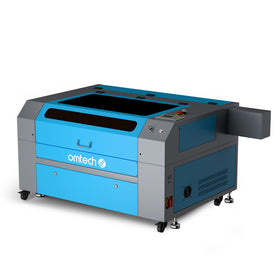
You can go straight for a larger Gantry CO2 Laser (like an OMTech 50W–80W). They are big, heavy, and loud, but they give you massive cutting beds, blistering speeds, and the ability to process large sheets of material to scale your Etsy store efficiently.

- You do not need expensive, fragile room filters. You can buy a cheap, powerful industrial exhaust blower and vent the smoke directly out a wall port or garage door crack.
- You have the physical footprint and power outlets to support large, cabinet-style machines. You can run loud air compressors (essential for clean cuts) and industrial water chillers without waking anyone up.
How Your Workspace Affects Your Laser Engraver Choice
| Environmental Factor | Home / Apartment Setup | Garage / Workshop Setup |
| Laser Enclosure | Must be 100% factory-enclosed (Class 1) | Can be open-frame (with safety glasses) or cabinet |
| Fume Management | Heavy-duty inline fan to window OR a Fume Filter box | Standard industrial blower vented directly outside |
| Climate Control | Always regulated (Safe for all laser types) | Risk of freezing/overheating (Requires monitoring) |
| Machine Type | xTool S1, xTool F1 Ultra, Gweike Cloud | OMTech Cabinet CO2, Monport 60W+ |
Buying a Laser Engraver: Additional Tips For Etsy Sellers
- Avoid cloud-locked ecosystems: Reddit threads strongly emphasize avoiding Glowforge or any machine that requires an active internet connection to process files. If their servers go down, your business grinds to a halt. Look for machines compatible with LightBurn.
- Ventilation and hidden costs: Do not forget to budget for an inline fan, fume extractor, or window venting system. Engraving wood and cutting acrylic creates dense, toxic smoke that must be pushed outside your workspace.
- The acrylic trap: Diode lasers use a blue light spectrum that passes straight through clear, white, or light blue acrylic without marking it. If custom acrylic items are your target Etsy niche, you must invest in a CO2 laser.
 Final Thoughts on Buying a Laser Engraver for Etsy Businesses
Choosing the best laser engraver for an Etsy business isn't about buying the most expensive machine; it's about choosing the one that best matches your products, workspace, production goals, and budget.
By answering the four key questions covered in this guide(what materials you plan to work with, whether you'll focus on cutting or engraving, how much you can realistically invest, and where you'll operate your machine), you can narrow hundreds of options down to the one that will serve your business best.
For many new Etsy sellers, starting with the right machine is just as important as choosing the right products to sell. Investing in a laser engraver that fits your current needs while leaving room to grow will help you produce higher-quality products, work more efficiently, and avoid costly upgrades later. With the right setup, you'll be well positioned to turn creative ideas into a profitable and sustainable laser engraving business.
You may also be interested in how to start a profitable laser engraving business on Etsy as you explore profitable ways to maximize your platform's revenue.