Safe and Creative Laser Projects for K12 Classrooms
A Year 8 student in a UK after-school makerspace made her first cut on a 55W CO₂ laser in October. She hadn’t used design software before the start of term in September. By December, she was selling laser-engraved bookmarks at the school Christmas fair for £6 each. Her teacher mentioned it was the first time in years she’d shown real enthusiasm in lessons.

That kind of turnaround isn’t rare. In UK primary and secondary settings, laser cutters tend to hook students quickly — because the feedback is immediate, tangible, and genuinely satisfying. A pupil designs something on screen and, minutes later, holds the finished piece.
This guide walks through beginner-friendly laser cutter projects for UK classrooms (Key Stages 2–5), organised by difficulty, materials, and subject links. It also explains which CO₂ laser engravers suit school environments and how to prepare before students run their first job.

Why Laser Cutters Work So Well for Beginners
Most creative tools have a delay between effort and outcome. Laser cutters compress that gap. The machine handles precision — students focus on design.
Laser cutting uses a focused beam to cut or engrave materials with high accuracy — the same process used in real manufacturing. In school, students aren’t using a simplified version; they’re using industry-relevant technology.
That authenticity matters. Work produced on a laser cutter feels more “real” than a printed worksheet or even some 3D prints — and students respond to that.

Classroom Example (UK Context)
A Year 5 teacher in Manchester introduced laser cutting into a maths unit on geometry. Pupils designed tessellating shapes, cut them from thin wood, and assembled display panels now mounted in the corridor. Students who struggled with abstract concepts understood them quickly once they could manipulate physical pieces.

Project Types by Key Stage
| Key Stage | Project Type | Materials | Lesson Time |
|---|---|---|---|
| KS2 (Primary) | Name tags, ornaments, shapes | Cardboard, basswood | 45–60 min |
| KS3 | Keyrings, bookmarks, coasters | Wood, cork, acrylic | 60–90 min |
| KS4 | Enclosures, models | Plywood, acrylic | 90–120 min |
| KS5 / CTE | Assemblies, signage | Thicker materials | Multi-session |
Best Materials for Beginners
Starting with the right materials makes everything easier — cleaner cuts, less smoke, fewer failed jobs.
| Material | Best Use | Beginner Friendly | Notes |
|---|---|---|---|
| Basswood (3mm) | Tags, coasters | Very easy | Clean cuts, low smoke |
| Cork | Coasters | Very easy | Forgiving, minimal fumes |
| Birch plywood | Signs | Easy | Slight charring possible |
| Acrylic (3mm) | Keyrings | Easy | Clean polished edges |
| Cardboard | Prototyping | Easy | Cheap, watch fire risk |
| Leather | Bookmarks | Medium | Avoid chrome-tanned |
| Slate | Plaques | Medium | High contrast engraving |
Start with basswood and cork for the first lessons — they give the most consistent results.

25 Beginner Projects for UK Classrooms
Tier 1 — First Lesson (30–60 minutes)
1. Engraved Name Tag
Students type their name, choose a font, and engrave it. A simple but powerful first success.
2. Wooden Coaster
The classic starter project. Teaches engraving settings and produces something useful.
3. Seasonal Ornament
Great for Christmas fairs or school events. Encourages creative shapes.
4. Bookmark
Cross-curricular with English — engrave quotes from class texts.
5. Acrylic Keyring
Introduces cutting paths and basic design layout.

Tier 2 — Skill Building (60–90 minutes)
6. Classroom Sign
Design a sign for a lab or classroom. Teaches layout and composition.
7. Science Model (Atom/Molecule)
Coloured acrylic pieces assembled into scientific models.
8. Architectural Model
Cut foldable cardboard structures — excellent for iteration learning.
9. Slate Coaster
Introduces different material behaviour and engraving contrast.
10. Puzzle Design
Teaches tolerance and precision — pieces must fit correctly.
Tier 3 — Curriculum Projects (Multi-session)
11. UK Map Cut-out
Geography integration — label cities, rivers, regions.
12. Maths Manipulatives
Custom geometry sets made to exact dimensions.
13. Electronics Enclosure
For GCSE/A-Level engineering — design housings for Arduino/Raspberry Pi.
14. Awards/Trophies
Students design real awards — increases engagement dramatically.
Real School Example (UK-Style Adaptation)
A secondary school makerspace in Birmingham turned laser cutting into a small enterprise. Year 9 students created personalised keyrings and bookmarks for parents and staff. Over one academic year, they raised over £1,800 to reinvest into equipment — while learning pricing, production, and basic business skills.
Choosing the Right Machine for Schools
The best machine depends on usage level and student age.
Key considerations:
- Fully enclosed (Class 1 safety)
- Easy software (LightBurn)
- Minimal maintenance
- Reliable ventilation setup
Typical setups:
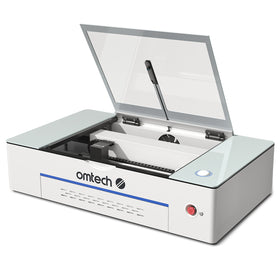
- Smaller labs / primary → compact 50–60W CO₂ machine
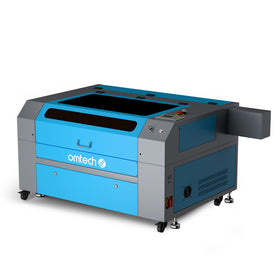
- Busy secondary labs → larger bed (20"×28") for throughput
- Advanced courses → higher power for thicker materials
Before Students Use the Laser: Setup Checklist
The first session often determines whether a programme runs smoothly.
1. Test ventilation
Run the machine empty and confirm proper extraction.
2. Create a material test chart
Students can reference it instead of guessing settings.
3. Prepare a file template
Avoids common beginner mistakes.
4. Stock extra materials
Expect mistakes — plan for them.
5. Train staff first
Confidence at the front of the classroom matters.
Why This Works in UK Education
Laser cutting aligns naturally with:
- Design & Technology (DT)
- STEM initiatives
- Project-based learning
- Ofsted focus on applied skills
It also supports Gatsby Benchmarks by exposing students to real industry tools and workflows.
FAQs
What are the best beginner projects?
Coasters, bookmarks, keyrings, and name tags — simple, fast, and reliable.
What materials are safest?
Basswood, cork, acrylic, and birch plywood. Avoid PVC and unknown plastics.
Is it safe for students?
Yes — with enclosed machines, proper ventilation, and a clear safety protocol.
How long do projects take?
30–45 minutes for simple tasks; up to several sessions for complex builds.
Can students sell their work?
Yes — school fairs and fundraising events are ideal. Personalised items sell best.
What software is used?
LightBurn is the industry standard; Inkscape is a free design option.