Integrating Laser Cutting Into STEM Curriculum: A Guide for Teachers
Three years ago, I installed a laser cutter in my Design & Technology classroom using a small grant and absolutely no prior experience. The first few weeks were messy — incorrect settings, extraction issues, and one very concerned site manager after a smoke alarm incident.
By the end of the first term, everything changed.

Students were designing, prototyping, and producing finished work that genuinely impressed parents, governors, and external assessors. That shift is exactly why this guide exists: you don’t need a perfect workshop or a huge budget to bring laser cutting into your school. You need the right equipment, proper safety procedures, and a clear plan for how it fits into teaching and learning.
OMTech CO₂ laser engravers are already used in workshops, makerspaces, and classrooms across the UK. This guide covers what actually matters — safety compliance, budgeting, curriculum integration, setup, and choosing a machine that works in a real school environment.

Why UK Schools Are Adopting Laser Cutters
Walk into a well-equipped Design & Technology department or STEM lab in the UK today, and you’ll often find a laser cutter in regular use.
That’s not a trend — it’s a response to how students learn best.
Laser cutters provide something traditional classroom tools often can’t: immediate, tangible outcomes. A student designs a component digitally and holds the finished result minutes later. That rapid feedback loop accelerates understanding of iteration, tolerances, and real-world manufacturing.
This aligns closely with priorities outlined by the UK Department for Education — particularly around:
- Applied learning
- Technical skills development
- Career readiness in engineering and manufacturing
Real UK Classroom Example
A secondary school in Manchester introduced a 60W CO₂ laser cutter into a Year 10 Design & Technology course mid-term.
Within weeks, students were:
- Producing laser-cut components for robotics competitions
- Creating engraved signage for school facilities
- Building enclosures for electronics coursework
By the end of the term, the department was using the machine across multiple year groups — and partially offsetting costs through materials budgets and project-based funding.

What Type of Laser Cutter Works Best in UK Schools?
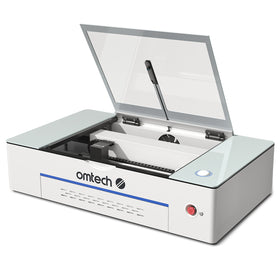
Not all laser systems are suitable for classrooms. In the UK, the focus is on safety compliance, ease of use, and reliability.
| Laser Type | Best For | Typical UK Use |
|---|---|---|
| CO₂ Laser | Wood, acrylic, leather, card | Design & Technology, Art, STEM |
| Diode Laser | Light materials | Budget / occasional use |
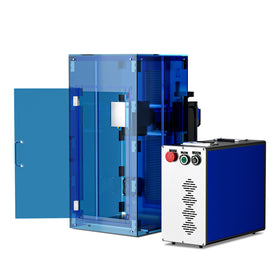
| Fiber Laser | Metal marking | FE colleges, advanced engineering |
| MOPA Fiber | Precision / colour marking | Specialist or higher education |
For most UK secondary schools and academies, a CO₂ laser cutter is the right choice.
UK Safety Requirement: Enclosed Systems Only
Laser systems must comply with UK safety expectations:
- Fully enclosed (Class 1 equivalent)
- Interlocked doors
- Emergency stop functionality
Open-frame (Class 4) lasers are not suitable for classrooms.
You should also ensure alignment with:
- Health and Safety Executive (HSE) guidance
- CLEAPSS recommendations for school equipment
Key Factors Before Purchasing
1. Safety Compliance
Choose a fully enclosed system with:
- Interlock protection
- Emergency stop
- CE marking
2. Ease of Use for Students
Look for:
- LightBurn compatibility
- Autofocus
- Camera positioning (optional but helpful)
Students should be able to operate independently after initial training.

3. Work Area Size
- Small desktop: suitable for individual work
- Larger bed (500 × 700 mm or more): better for class throughput
4. Extraction & Ventilation
Laser cutting produces fumes — this is non-negotiable in UK schools.
Options:
| Setup | Cost | Notes |
|---|---|---|
| External ducting | £150–£400 | Requires wall access |
| Filtered extraction unit | £800–£2,000+ | Common in UK classrooms |
5. Support & Warranty
Downtime affects teaching delivery.
Choose suppliers offering:
- UK-based support
- Spare parts availability
- Training resources
Laser Cutter Cost for UK Schools
Here’s a realistic UK budget range:
| Level | Machine Type | Cost | Best For |
|---|---|---|---|
| Entry | 40–55W CO₂ | £700–£1,300 | Art rooms, light use |
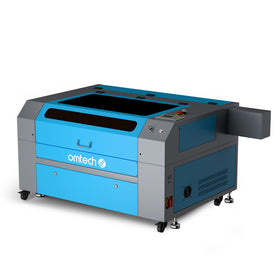
| Mid-range | 60–100W CO₂ | £1,500–£2,800 | Active D&T / STEM |
| Advanced | 100W+ / Fiber | £3,000–£6,000+ | FE / engineering |
Additional Costs
- Extraction: £150–£2,000
- Software: ~£50 (one-time)
- Consumables: £80–£250/year
- Materials: ongoing
UK Funding Options
Common funding routes include:
- T Level funding
- DfE capital funding programmes
- Local authority grants
- Academy trust budgets
- PTA / school fundraising
- Industry partnerships
Grant Tip
Always budget the full system:
- Machine
- Extraction
- Software
- Materials
- Training
Incomplete budgets are a common reason projects stall after approval.

Integrating Laser Cutting Into the Curriculum
The machine is just a tool — the value comes from how you use it.
Design & Technology
- Product design prototypes
- Architectural models
- CAD/CAM workflows
Art & Design
- Layered artwork
- Engraved pieces
- Exhibition work
Science
- Lab equipment
- Models and visual aids
Maths
- Geometry tools
- Scaled models
- Data visualisation
Example Teaching Approach
A teacher in Birmingham runs a termly “design sprint”:
- Students sketch a concept
- Model it digitally (Inkscape / CAD)
- Produce a prototype using the laser
Outcome:
- Portfolio-ready projects
- Real understanding of design-to-manufacture
Recommended Laser Setups for Schools
Entry-Level (Art & Intro STEM)
- Compact CO₂ system
- Built-in cooling
- Simple operation
Mid-Level (Active D&T Labs)
- Larger bed size
- Faster throughput
- Multi-class usage
Advanced (FE / Engineering)
- Higher wattage
- Industrial-level output
- Supports fabrication workflows
Step-by-Step: Setting Up Your Programme
- Define curriculum use
- Assess classroom space
- Plan full budget
- Secure funding
- Select machine
- Install extraction
- Train staff
- Implement safety protocols
- Start with one project type
Frequently Asked Questions
What is the best laser cutter for UK schools?
A fully enclosed CO₂ laser (55W–100W) is ideal for most secondary schools and academies.
Is laser cutting safe for students?
Yes — with:
- Enclosed machines
- Proper supervision
- Written safety procedures
What materials can be used?
- Wood
- Acrylic
- Card
- Leather
- Rubber
(Not metals unless using fiber laser systems.)
What software is used?
LightBurn is the most widely used platform — simple enough for beginners, but used in industry.
Can students use it with no experience?
Yes. Most students become confident after 1–2 supervised sessions.
Do schools need a water chiller?
- Some machines include one
- Higher power systems require external chillers
For UK schools, academies, and FE colleges, laser cutting is no longer a “nice-to-have” — it’s becoming a core tool in modern STEM and Design & Technology education.
It delivers:
- Hands-on learning
- Real-world skills
- Faster iteration
- Higher student engagement
And once it’s properly integrated, most teachers come to the same conclusion:
It transforms how students learn — and what they’re capable of producing.