Top Laser Engravers for Schools: Safe, Capable Machines for Today’s Classrooms

Laser engraving has become a powerful educational tool, opening doors to hands-on learning across STEM, design, art, and career-technical programs. In makerspaces and school workshops, students use laser cutters to build models, craft awards, prototype inventions, and bring their ideas into the physical world. With one machine, a class can cut wood for engineering challenges, engrave acrylic for design projects, or explore advanced fabrication skills.
But finding the right laser for a school setting takes more than comparing wattage or price. Safety, reliability, workspace limitations, and student usability all matter. This guide breaks down the top OMTech machines for educational environments and helps you identify the best fit for your program.
Buying Laser Engravers For Schools in the UK
When buying a laser engraver for a school in the UK, you cannot make the common mistake of buying the cheapest machine you can find. First, schools in the UK prioritize educational safety compliance, and there are certain rules that a laser engraver to be installed at an educational institution must comply with. Also, where you get the machine from matters, as well as (of course), the type of machine.
Best Types of Laser Engravers for UK Schools (Primary, Secondary, and Tertiary)
When buying a laser engraver for a school, it is very important to keep in mind that each educational tier requires a fundamentally different machine based on student age, curriculum demands, and risk tolerance.
1. Primary School (Ages 5–11): Absolutely Safe and Simple Diode Laser Engravers
For primary schools in the UK, the best laser engraver option would be a low-power, entry-level enclosed diode laser engraver. The primary goal here is to find a laser engraver that maximizes a creative introduction without any exposure to raw laser light, high voltage, or complex software.
Here are 4 key features you must consider when buying your diode laser engraver for a primary school:
- Safety: Look for a Class 1 Laser Certification (fully enclosed, meaning it is as safe as a CD player). It must have an instant auto-shutoff when the lid opens.
- Easy workflow: Look for app-based, icon-driven software. Children should be able to draw a picture on paper, take a photo with a tablet, and send it straight to the machine.
- Material compatibility: Restrict its use entirely to safe materials like cardboard, paper, and thin plywood. Avoid plastics due to immediate toxic gas risks.
OMTech Solis Duo 20W Diode and 30W Fiber Laser Engraver: Versatile Long-Term Laser Engraver For Primary Schools.
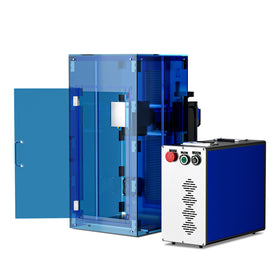
The OMTech Solis 20W diode/30W fiber laser engraver allows you to seamlessly handle both metal and non-metal projects with ease. You can toggle between a 45nm diode laser and a 1064 nm infrared laser, giving your primary school the flexibility for in-class use and extracurricular use all in one machine.

With the 20W diode laser, you can easily create unique keychains, wallets, and decor from wood, leather, and acrylic in the classroom, allowing young pupils to experience the wonders of continuous, hassle-free engraving.
The 30W fiber laser is also practical for out-of-class use and allows your institution to engage in more complex metal engraving projects to enhance your brand, show the value you provide, and advertise your school through thoughtful and creative designs on gold, silver, copper, and other precious metals.
It is a fully enclosed machine that meets both FDA AND CE standards, with a tinted acrylic window that effectively prevents laser leakage. Safe for use in all environments and unlimited in the opportunities it provides.
2. Secondary School (Ages 11–18): Versatile and Industry-Ready CO2 Laser Engravers
For students in secondary school, enclosed desktop or mid-sized CO2 lasers are best. That is because Students at this stage are learning design and technology (D&T) frameworks. They need to understand engineering tolerances and production workflows.
So, look for a freestanding or robust desktop CO2 laser (50W to 60W). It must feature rigid UK health and safety modifications, key-switch locking, and interlocked access doors.
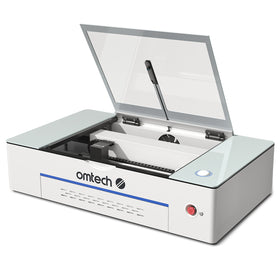
 Consider the OMTech Polar+ 55W Desktop CO₂ Laser Engraver, which features a large 20" × 12" workspace for bigger engraving materials and is capable of reaching a maximum engraving speed of 500 mm/s. With this machine, you can easily cut and engrave cut and engrave 3mm to 6mm acrylic, MDF, plywood, and leather for diverse student projects.
It also includes rotary, touchscreen, built-in chiller, camera, and air assist and is compatible with LightBurn, which is the industry software for education.
3. University / Higher Ed (Ages 18+): High-Power CO2 Lasers For Maximum Material Diversity
For a UK university, look for industry-size laser engravers. University students require rapid prototyping speed, heavy-duty cycles, and the ability to process advanced materials like stainless steel, anodized aluminum, and thick hardwood. The environment needs to mimic commercial fabrication labs. Students manage their own machine settings, material testing, and advanced vector optimization.
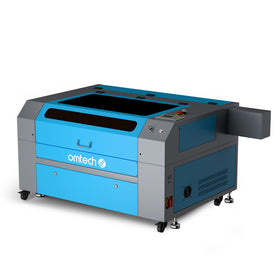
Consider the OMTech Pronto 40, a 90W CO₂ laser with a 900mm × 600mm work area that engraves at a top speed of up to 1000 mm/s. It comes with a high-capacity fan for proper ventilation, an autofocus feature for non-contact use, and upgraded safety features; excellent for programs where students work on complex or large-format builds.
Laser Engravers For UK Schools Compared
|
Level |
Ideal Laser Engraver Type |
Recommended Model |
|
Primary School (Ages 5–11) |
Diode Laser Engravers |
OMTech Solis Duo 20W Diode and 30W Fiber Laser Engraver |
|
Secondary Schools (Ages 11–18) |
Desktop or Free-standing CO2 Laser Engravers |
OMTech Polar+ 55W Desktop CO₂ Laser Engraver |
|
University / Higher Ed (Ages 18+) |
Industry-standard laser engravers |
OMTech Pronto 40 Laser Engraver and Cutter |
Buying a Laser Engraver for a School in the UK: Universal Checklist Across All Levels
1. Fume Extraction is Mandatory
Every machine across all three tiers needs dedicated extraction. For primary and secondary schools, a premium Local Exhaust Ventilation (LEV) unit with multi-stage carbon filters is vital if you cannot vent directly through an outside wall.
-
Outside Venting is Vital: Fumes from materials like acrylic or MDF are highly toxic. Several users based in the UK emphasize that an external vent out a window or wall is mandatory.
-
Beware of Multi-Filters: "Classroom filters" exist, but they require frequent, expensive HEPA/carbon filter replacements and rarely eliminate 100% of odors
2. The "No-Fly" List for Schools
Never purchase open-frame "Class 4" diode lasers where the beam is exposed. Do not buy unbranded machines from online marketplaces. They lack crucial safety interlocks, UK/EU CE certification, and fire-retardant glass shields.
3. Software Choice matters
Avoid proprietary, outdated software. Buying a machine compatible with LightBurn Software is essential because it teaches students an industry-standard workflow.
3. Insurance and Compliance
Always check with risk assessment first: Before spending any school budget, consult your school's insurance provider. Many standard policies will immediately reject unvented or open-frame (Class 4) laser configurations in a student environment.
What Schools Should Look For in a Laser Engraver
Educators searching for classroom-ready machines should prioritize:
- Strong Safety Standards: Fully enclosed builds, keyed access, emergency stops, and proper exhaust systems are essential for student use.
- Easy-to-Use Software: Programs such as LightBurn and RDWorks offer approachable interfaces and broad file compatibility—ideal for students and teachers.
- Reliable Support and Resources: OMTech provides responsive customer service and extensive online documentation, reducing frustration during class time.
- Cutting & Engraving Capability: Machines with solid engraving speeds and at least moderate cutting depth help ensure students finish projects within a class period.
- Space Requirements: Compact engravers work well for crowded classrooms, while larger machines fit better in dedicated labs or fabrication studios.
- Budget Flexibility: OMTech offers entry-level units, mid-range options, and refurbished machines, making it easier for schools to adopt laser technology at different price points.
OMTech K40+ — 40W Desktop CO₂ Laser Engraver

Best for: Entry-level courses, art rooms, small budgets
The K40+ is OMTech’s most economical and compact option, perfect for teachers introducing laser technology for the first time.
Key Specs:
- 45W CO₂ laser
- 8" × 12" working area
- ~300 mm/s engraving speed
- Compatible with LightBurn & LaserGRBL
- Cuts 0.4" acrylic, 0.2" wood, 0.6" leather
Pros:
- Very affordable
- Small footprint for tight classrooms
- Simple USB connection
- Built-in cooling tube
- Comes with a 2-year warranty
Cons:
- Limited workspace
- Fewer advanced features
- No air assist, autofocus, or touchscreen
OMTech Polar+ — 55W Desktop CO₂ Laser Engraver

Best for: Makerspaces and tech-focused classrooms
The Polar+ delivers impressive power in a clean, user-friendly design, offering integrated systems ideal for environments with rotating student groups.
Key Specs:
- 55W CO₂ laser
- 20" × 12" workspace
- 500 mm/s max engraving speed
- LightBurn compatibility
- Includes rotary, touchscreen, built-in chiller, camera, and air assist
Pros:
- Touchscreen controls for easy student operation
- Plug-and-play cooling and air assist
- Excellent precision for detailed projects
- Autofocus streamlines setup
Cons:
- More expensive than entry-level units
- Smaller bed than full-size lab machines
OMTech Turbo-646 — 60W CO₂ Laser Engraver

Best for: Schools needing versatility and stronger cutting ability
This mid-sized model balances power, space, and affordability, making it ideal for engineering, design, and career-technical classrooms.
Key Specs:
- 60W CO₂ laser
- 16" × 24" workspace
- Up to 600 mm/s engraving speed
- Works with RDWorks, LightBurn, CorelDRAW, AutoCAD
- Cuts up to 0.4" materials
Pros:
- Broad software compatibility
- Strong cutting performance for thicker materials
- Large enough for substantial student projects
Cons:
- Occupies more floor space
- Requires proper ventilation
OMTech Pronto 40 — 90W CO₂ Laser Engraver

Best for: High school fabrication labs and advanced technical programs
The Pronto 40 combines high power, speed, and upgraded safety features—excellent for programs where students work on complex or large-format builds.
Key Specs:
- 90W CO₂ laser
- 24" × 35" work area
- Up to 1000 mm/s engraving
- Compatible with LightBurn, RDWorks, CorelLaser
- Safety housing, improved electronics, built-in air assist
Pros:
- Fast performance for large classes
- Enhanced safety design for school environments
- Handles demanding and oversized projects
Cons:
- Premium price point
- Requires trained supervision and dedicated lab space
Which OMTech Laser Should Your Classroom Choose?
|
Model |
Best For |
Power |
Work Area |
Speed |
Key Strengths |
|
K40+ |
Beginners & tight budgets |
40W |
8" × 12" |
300 mm/s |
Affordable, compact |
|
Polar+ |
All-in-one tech classrooms |
55W |
20" × 12" |
500 mm/s |
Integrated features, touchscreen |
|
Turbo-646 |
Mid-level technical programs |
60W |
16" × 24" |
600 mm/s |
Versatile, strong cutting |
|
Pronto 40 |
Advanced STEM & fabrication labs |
90W |
24" × 35" |
1000 mm/s |
High power, safety, speed |
Bring OMTech Laser Education to Your School
OMTech provides reliable, classroom-ready laser systems for every stage of learning—from introductory courses to advanced fabrication programs. Whether you’re equipping a single classroom or a full technology lab, OMTech offers powerful, safe, and cost-effective tools that help students bring their creativity to life. Explore OMTech’s full range of educational laser engravers today!