How to Choose a Laser Engraver for Metal in the UK
The very first thing to know when choosing a laser engraving machine for metal is that not every type of laser engraving machine can mark metal effectively.
But even amongst laser engravers designed for metal, performance can vary considerably depending on specific factors like the laser source, pulse control, wattage, and the size of the working area, which tend to vary depending on the machine.
So, the best approach when choosing a laser engraver for metal is always to have a clear understanding of what you want to achieve. Having a clear picture of what type of metal you will be working with and what types of designs you intend to create ( adding serial numbers to tools, personalizing jewelry, marking logos on stainless steel, or creating detailed designs on aluminum, etc.) will help you:
- choose the laser engraver with the specific features you
- buy a machine at the right price without paying for capabilities you do not need.

1. Start By Choosing the Right Type of Laser Engraver for Metal
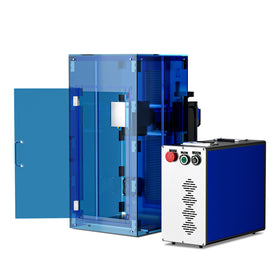
For metal engraving or marking, you need a fiber laser engraver. Fiber laser engravers are best for metal engraving and marking because they are specifically made to mark or engrave bare metals directly.
A fiber laser marker uses a wavelength of 1,064 nanometers (nm) that many metals absorb efficiently, allowing the machine to produce permanent markings, fine details, and, with suitable power and settings, deeper engraving on metals and stainless steel.
This is an important distinction because not all types of laser engravers are designed to work with metal, and some can only be used on metal with modifications, tricks, and techniques. It is, in fact, possible (with some adjustments and techniques) to engrave metal with some CO2 laser engravers, but a fiber laser engraver is innately made for metal: it allows you to do metal marking quickly, efficiently, consistently, and with the least amount of stress and time wastage. If you have any plans for serious metal engraving, a fiber laser engraver is the top choice.

Can You Use a CO2 Laser Instead of a Fiber Laser For Metal Engraving? Fiber vs. CO2 For Metal Engraving
- Fiber lasers are designed for metal marking and engraving; they are well suited to stainless steel, aluminum, brass, copper, titanium, and many other metals, depending on the machine's specifications and processing settings.
- CO2 lasers are primarily designed for materials such as wood, acrylic, leather, paper, and glass. Some CO2 lasers can mark coated metals or use marking compounds to create a surface mark, but this is different from directly engraving bare metal.
So, if metal is your primary material, or if metal engraving is a significant portion of your overall workflow, start by looking at fiber laser engravers. You can then narrow your options by comparing pulse technology, wattage, and the other features that determine how well a machine suits your application.
2. Decide Whether You Need MOPA or Non-MOPA
Once you have decided on a fiber laser, the next question is: what kind of laser engraver? In other words, do you need a MOPA fiber laser engraver or a standard laser engraver?
The difference matters because the laser's pulse characteristics affect how energy interacts with the metal surface, influencing color marking, contrast, heat input, and engraving performance.
In other words, there are some metal engraving results you can best obtain with a MOPA fiber laser, and there are other kinds of results you can best obtain with a standard non-MOPA fiber laser.

First, What Is a MOPA Fiber Laser?
MOPA stands for Master Oscillator Power Amplifier. The distinctive feature of a MOPA fiber laser is that the pulse duration of the laser is flexible, meaning you can adjust it to have more precise control over how much energy will be delivered to the material you are working on.
This flexibility is a major advantage when you are working with stainless steel, aluminum, and other kinds of metal that usually require different surface effects. For example, if you are working with stainless steel, a MOPA laser can allow you to:
- produce a range of colors on suitable stainless steel surfaces by carefully controlling the settings
- create high-contrast marks on certain anodized aluminum products and process delicate designs
However, it is very important to keep in mind that color marking is not guaranteed on every type of metal. Also, MOPA fiber lasers are usually more expensive than standard fiber laser engravers. So if color engraving is not really your priority, and/or you are operating on a limited budget, there is nothing wrong with starting with a standard fiber laser and upgrading to MOPA at some later date when your business is doing better.
When Should You Choose MOPA vs. Non-MOPA For Metal Marking?
| Key Factor | Choose a MOPA Fiber Laser | Choose a Non-MOPA Fiber Laser |
| Main application | Specialized marking and varied surface effects | General-purpose metal marking |
| Color marking | Better suited to producing colors on compatible metals, particularly stainless steel | Generally more limited for controlled color marking |
| Anodized aluminum | Useful for producing high-contrast marks with carefully controlled settings | Suitable for many standard marking applications |
| Pulse control | Adjustable pulse duration across the machine's supported range | Typically less adjustable pulse duration |
| Heat-sensitive applications | Greater flexibility for managing heat input | Suitable when standard pulse characteristics meet the requirements |
| Production requirements | Best when different marking effects and greater process flexibility are important | Best when consistent, conventional markings are the priority |
| Budget | Often costs more | Often more economical |
Summary
- The bottom line is this: choose MOPA if you want more precise control over the metal markings you are making, especially if color marking and specialized surface effects are important.
- Choose non-MOPA if you mainly need dependable, permanent marks and want to keep your initial investment lower.

3. Choose the Right Laser Engraver Wattage for Your Metal Engraving Needs
Wattage is another major consideration when choosing a fiber laser engraver for metal. How many watts the laser engraver is influences how much laser power the machine can deliver and also goes a long way toward determining the speed and depth at which you are able to engrave.
But here is a very important point to keep in mind: higher wattage does not automatically mean better engraving quality:
- If you just want fine marks, a 30W fiber laser is enough; you don't really need a high-powered fiber laser.
- You only really need a 60W+ fiber laser if you are doing deep engraving or if your production volumes are really high.
Your goal should be to choose enough power to handle your workload efficiently without spending unnecessarily on capacity you will rarely use.
What Fiber Laser Wattage Should You Choose?
| Fiber Laser Wattage | Best For | Why Choose It? |
| 30–50W | Small businesses, jewelry, personalized gifts, serial numbers, logos, and general metal marking | Offers a practical balance of cost and performance for many routine marking jobs |
| 50–60W | Small-to-medium businesses, workshops with varied projects, more demanding engraving, and regular production | Provides additional power for jobs that require more material removal or improved throughput |
| 80–100W | Industrial applications, frequent deep engraving, larger workloads, and production environments | Can support faster processing and more demanding material-removal tasks when properly configured |
Is 50–60W the Sweet Spot for Metal Engraving?
For many small businesses and professional workshops, 50–60W is an ideal starting point for metal engraving because it balances versatility with production capability. A decent fiber laser engraver in this range has the capacity to accommodate a broad mix of routine marking jobs and more demanding projects without requiring you to invest heavily in a bigger machine.
However, a 60W fiber laser engraver cannot be the ideal choice for every metal engraving or marking application. A 30W fiber laser may make more sense if your business is focused on fine, shallow marks, while an 80–100W machine may make more sense when deep engraving and production throughput are central to the operation.

4. 5 Additional Key Factors to Look for in a Fiber Laser Engraver
The laser source and wattage determine much of a machine's processing capability, but you would be likely to make a mistake if you think that those are the only two factors to consider when buying a laser engraver for metal. Here are five more factors to consider:
i. The working area
The working area determines the maximum space available for positioning your parts. Larger fields can accommodate bigger products or multiple smaller items in one setup.
- For jewelry engraving, as well as small tools and individual components, a fiber laser engraver with a smaller 4.3" x 4.3" working area may suffice.
- But for bigger metal engraving projects, or larger batches, you need a fiber laser with a larger 6.9" x 6.9"+ working area.
Choose a working area that accommodates your largest regular projects, with enough room for practical positioning.
ii. A Galvanometer Scanning System
For metal engraving, you ideally want a galvo fiber laser engraver. The galvanometer is a scanning system that most desktop fiber lasers use to direct the beam across the marking field. It is faster, helps with better consistency, and it allows the machine to be able to produce finer details.
So, when buying, compare marking speed alongside accuracy, repeatability, and performance on the materials and designs you intend to process.
iii. Rotary Attachment Compatibility
For a laser engraver for metal, rotary compatibility is a must-have. A rotary axis attachment allows you to mark cylindrical or curved objects, such as tumblers, rings, and certain tools. Without rotary support, engraving around these surfaces can be very difficult. If you plan to personalize cylindrical products, check whether the machine supports a compatible rotary attachment and whether the required accessories are included or sold separately.
iv. Software and File Compatibility
Your laser engraver should fit into your existing design workflow. Software determines how you prepare artwork, adjust parameters, position designs, and send jobs to the machine. Difficult software can slow production, especially when you need to repeat jobs or switch between products.
What to look for: Check supported file formats, operating-system compatibility, available marking controls, and whether the software is included. Confirm that it supports the functions you need, such as variable-data marking or serial-number generation, if these are important to your work.
v. Focusing and Positioning
Ensure that the machine includes a clear focusing method, a height-adjustable work surface, an autofocus feature, or a practical manual focusing system. Choose the arrangement that best suits your workflow and the variety of parts you process.

Final Thoughts on Choosing a Laser Engraver for Metal
In summary, your ideal fiber laser engraver for metal engraving should match your materials, marking requirements, production volume, and budget without leaving you paying for capabilities you do not need. Here are some pointers:
- For a small business handling a mixture of stainless steel, aluminum, jewelry, tools, and personalized products, a 50–60W fiber laser can be a practical starting point.
- If you need color marking on compatible metals, greater control over surface effects, or more flexibility when processing anodized aluminum, a MOPA model may be worth the additional investment.
- If your work mainly involves standard logos, serial numbers, and identification marks, a conventional non-MOPA machine may be the more economical choice.
Beyond the laser itself, look for a suitable working area, dependable scanning performance, compatible software, practical focusing controls, and rotary support if cylindrical products are part of your business. Safety features, technical support, and warranty coverage should also form part of your decision.
Final Thoughts on Choosing a Laser Engraver For Metal.
Most importantly, evaluate the machine against the actual jobs you expect it to perform. Compare sample results on your intended materials, ask about realistic processing times, and check whether the machine can achieve the marking depth and finish you require.
The best fiber laser engraver is not necessarily the most powerful or expensive one. It is the machine that consistently delivers the results your work demands while giving you room to grow.
You may also be interested in our complete guide on the best fiber engravers for metal in 2026.