How to Choose the Best Laser Engraver for Aluminum: Buying Guide and Top Picks
The mistake a lot of people make when buying a laser engraving machine specifically or primarily for aluminium engraving is to assume that all types of aluminium are the same and respond to laser heat in the same way. In reality, choosing the right setup depends entirely on whether your aluminum is raw or anodized, and on your budget.
Before we get into the specifics, here is an important summary: to engrave or mark aluminium effectively, you need a 1064nm fiber laser (20W to 60W+) for bare metal, or a standard diode laser if you're only stripping the colored coating off anodized aluminium or using marking sprays. Standard blue-light diodes and CO2 lasers bounce off raw aluminum and can't carve into it.
Also, you need to be aware of some specific features and specs to look for, as well as some common workarounds you may have to employ to overcome some of the inherent challenges of engraving aluminum with a laser engraver.

Laser Engravers For Aluminum: Fiber vs. Diode Lasers
Fiber lasers (1064nm)
Fiber laser engravers are the gold standard when it comes to engraving raw, bare aluminium. They are the best for aluminium because their 1064nm wavelength and high peak-power pulsed beams permanently cut into bare metal at high speeds: in other words, they engrave deep, fast, permanent marks, which is what you typically want when engraving aluminium.
Most people go for popular entry-to-mid-tier hobbyist/prosumer options, including the OMTech Galvo series, ComMarker B4, and Gweike G2.
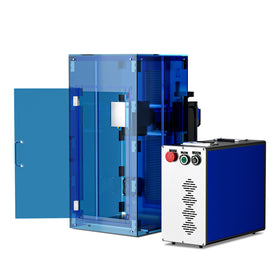
The FC20C Fiber Laser Engraver is an affordable entry model 20W Galvo Fibre Laser Marking Machine from OMTech that engraves at a speed of up to 10,000mm/s, reaches an accuracy of ±0.01 mm, and is perfectly versatile for engraving words, logos, pictures, barcodes, and more on metal (including personalized gold and silver jewelry!) and other materials with quick turnaround and perfect accuracy.
2. Diode lasers (with tricks)
Strictly speaking, blue diode lasers cannot engrave bare aluminium, but there is still a way you can use them for aluminium engraving projects. Blue diode lasers are excellent for burning off the top layer of anodized aluminum to reveal the silver metal underneath.
So you can still use them for marking aluminium if the metal is anodized, painted, or treated with a specialized marking spray. Generally, you'd need to use marking sprays like Cermark or LaserDark so the chemical bonds to the surface under the diode beam.

Choosing The Best Laser Engravers for Anodized Aluminum
If you intend to engrave anodized aluminium specifically, the technical requirements change drastically. You no longer need a dedicated fiber laser to carve away raw metal; a standard diode or CO2 laser engraver is all you need.
That's because engraving anodized aluminium doesn't involve cutting into the metal at all. It's simply a process of bleaching or vaporizing the organic color dye layer trapped inside the surface anodization, which reveals the naturally bright, off-white aluminum color underneath and creates a permanent, high-contrast mark.
Because the dye layer is microscopic, standard diode and CO2 lasers handle this perfectly, which means you can drop your entry budget significantly.

Recommended Laser Engravers for Anodized Aluminium Only
1. Best Affordable / Entry-Level (Under $500): Aufero AL2 Laser Engraver Machine
An open-frame, exceptionally cheap entry point. Equipped with a 5W or 10W diode module, it strips colors from phone cases, business cards, and luggage tags perfectly. A pure hobbyist machine with a slower gantry movement style.
Best Mid-Range Desktop ($500-$1,700) OMTech 20W Galvo Fibre Laser Marking Machine with Autofocus
Unlock precise engraving on anodized aluminium with the OMTech 20W Galvo Fiber Laser. Its autofocus ensures consistent results, while the red light preview and EzCad2 software streamline your workflow. Mark logos and designs at speeds up to 10,000 mm/s with exceptional accuracy.
Best Portable: xTool F2 5W IR and 15W Diode Portable Dual Laser Engraver
A portable, enclosed alternative designed specifically for detailed metal-marking tasks. The 15W diode easily processes colored anodized sheets, while the compact 5W infrared laser ensures you can still get perfect high-contrast marks on clear, uncolored anodized blanks. Available at Best Buy.
What to Look For When Buying a Laser Engraver For Anodized Aluminum
- Wavelength flexibility: Standard blue diode lasers (455nm) and CO2 lasers (10,600nm) are both incredibly efficient at stripping anodized dyes. If you plan to engrave other organic materials like wood or leather in the future, standard diode/CO2 lasers are the best choice for that flexibility.
- The "clear anodized" exception: Be aware that clear (silver) anodized aluminium has no pigment. Standard diode and CO2 lasers can't create contrast on clear anodizing, since there's no dark dye to bleach away; for clear coatings, you still need a 1064nm infrared or fiber source.
- Speed over raw power: You don't need massive 40W+ laser power just to remove dye; a 5W to 10W laser is plenty. Focus instead on movement speed (gantry or galvo style) and software compatibility (like LightBurn) to process your graphics quickly.
Choosing the Best Laser Engravers for Raw/Bare Aluminum
To engrave raw or bare aluminum, you must use a 1064nm wavelength laser (commonly known as a fiber or infrared laser). Here is the reason why: raw aluminium acts like a mirror to standard blue diodes and CO2 lasers, whose wavelengths it reflects away dangerously instead of absorbing, so nothing gets carved, and the reflected beam becomes a hazard.
Another thing about raw aluminum is that it also dissipates heat exceptionally fast, meaning you need targeted, concentrated energy density to make a permanent mark.
Key Specs to Look For
- Wattage: For real material removal and deep engraving on raw aluminium, a 30W to 60W fiber laser is ideal. 20W fiber lasers work for surface marking, but higher wattage gives you cleaner depth and faster speeds.
- Lens size: Field lenses (like 110x110mm vs. 200x200mm) dictate your work area. Smaller lenses concentrate more energy per square inch, making deep engraving more efficient.
Pro-Tip: Many "cheap" diode laser engravers ($200-$500) won't carve into raw aluminium at all. Good-quality entry-level fiber lasers usually start around $1,500 to $2,500.

Recommended Laser Engravers for Raw Aluminium
1. ComMarker B4 (20W or 30W Fiber)
A budget-friendly benchmark tool widely highlighted as the cheapest entry point for legitimate metal engraving. It is equipped with a solid Raycus source that easily handles serialization numbers, tool tags, and surface text on 6061 plates.
2. OMTech 30W MOPA JPT Laser Cutting Machine
The OMTech M-30 30W MOPA JPT Laser Cutting Machine has been highly praised for its sturdy configurations. Its adjustable pulse width enables precise control over color effects, creating stunning dark marks and patterns. Ideal for unique personalized creations, this machine offers versatility and precision in metal engraving.
3. OMTech M-60 60W MOPA JPT Laser Cutting Machine
The OMTech M-60 MOPA laser cutting machine is a high-volume heavy hitter, recommended for workshops needing to carve deep dimensional designs or demanding dark text on unpolished aluminum. It features a premium JPT M7 MOPA source that offers complete control over pulse width variations to prevent melted edge burrs.
Additional Buying Considerations
- MOPA vs. Q-switched: Standard Q-switched fiber lasers will engrave raw aluminum, but they leave a lighter gray or silver frost finish. If you want a dark black permanent mark on bare aluminum, you'll want a MOPA fiber laser, which lets you fine-tune the pulse duration to induce an oxidative blackening effect instead.
- Galvo system: True metal lasers use a high-speed mirror galvanometer system rather than a slow, moving gantry crane. Look for machines with galvo heads to complete highly detailed graphics in seconds.
- Software compatibility: Make sure the machine natively supports LightBurn. Proprietary, locked-down hobby apps tend to lack the fine frequency controls needed to achieve clean depth in raw metal.
Common Tips and Workarounds for Laser Engraving Aluminium
- Anodized aluminium: Bleaching or burning off the colored anodized layer to expose the raw silver metal underneath gives the cleanest contrast.
- Marking sprays: Products like Cermark or generic laser marking sprays bond to the raw aluminium surface under heat, though this creates a surface etch rather than deep material removal.
- Pre-painted/coated metal: Spray painting bare aluminium black, engraving the paint off, and cleaning the metal is a popular, cheap alternative to a dedicated fiber laser.

Frequently Asked Questions About Laser Engraving Aluminium
1. Can you laser engrave aluminium without removing the anodized coating?
Yes, but the result depends on the type of aluminium and coating. With anodized aluminium, the laser typically removes or lightens the colored anodized layer rather than cutting into the underlying metal. If you want to create a permanent mark directly in bare aluminum, a fiber laser is generally required.
2. Can you laser engrave aluminium cans?
Yes, aluminum cans can be laser marked, but the results depend on the can's coating, thickness, and surface finish. A fiber laser can mark bare aluminium, while a diode or CO2 laser may work if the can has a suitable paint or anodized coating. Because cans are thin and curved, securing and focusing the material correctly is especially important.
3. Can you laser engrave aluminium business cards?
Yes. Aluminium business cards are commonly laser engraved, particularly when they have an anodized or painted surface. A diode laser can remove a colored coating to create a contrasting design, while a fiber laser is a better choice when you want to mark or engrave the underlying aluminum itself.
4. Can you laser engrave aluminium with LightBurn?
Yes, LightBurn can be used for many aluminium engraving applications, provided that the laser and controller are compatible with the software. It can be used to prepare text, logos, images, and other vector or raster designs before sending them to the laser. Always verify software compatibility before purchasing a machine.
5. How do you get a black mark on aluminium with a laser?
A black mark on aluminium can be produced using different techniques depending on the material. MOPA fiber lasers provide greater control over pulse duration and can produce darker marks on bare aluminium than conventional Q-switched fiber lasers. Another option is to engrave or mark a suitable coating using a lower-power laser.
6. Can you engrave colored anodized aluminium?
Yes. Colored anodized aluminium is particularly suitable for laser engraving because the laser can remove the dyed anodized layer and expose the lighter aluminium underneath. This creates a strong visual contrast without requiring deep material removal.
7. Can you engrave aluminium with a laser at home?
Yes, aluminum engraving can be done in a home workshop, but the appropriate machine depends on the material. Colored anodized aluminium can be suitable for lower-power diode lasers, while bare aluminium generally requires a fiber or infrared laser. Proper ventilation, laser safety equipment, and an enclosed setup are important considerations for home use.
8. What products can you make with laser-engraved aluminium?
Laser-engraved aluminium can be used to make personalized business cards, equipment tags, identification plates, nameplates, keychains, signs, serial-number plates, awards, and promotional products. Anodized aluminum is particularly useful for products where high-contrast personalization is more important than deep engraving.
9. Does laser engraving aluminium wear off?
Laser marks on aluminium can be highly durable, but their longevity depends on how the mark is created. Removing an anodized or painted coating exposes the underlying metal and produces a permanent contrast, while marking sprays and surface coatings can have different durability characteristics. For products exposed to heavy abrasion or outdoor conditions, testing the finished mark is recommended.
10. Can you laser engrave aluminium with a CO2 laser?
A CO2 laser can work well on certain coated or anodized aluminium surfaces, particularly when the goal is to remove a colored coating. However, a standard CO2 laser is not generally suitable for directly engraving bare aluminium because the metal reflects its wavelength. For direct marking or material removal on bare aluminum, a fiber laser is the more appropriate choice.

Final Thoughts on Choosing a Laser Engraver For Aluminum
The single biggest decision in choosing a laser engraver for aluminium is whether you're working with raw metal or anodized stock; the two call for completely different machines and budgets. If you're only stripping colored anodizing, a diode or CO2 laser in the hundreds-of-dollars range will do the job well
If you need to mark or engrave bare aluminium, you're looking at a 1064nm fiber laser starting around $1,500-$2,500, with wattage and MOPA vs. Q-switched capability determining how deep and how dark your marks can get. Get that fundamental choice right first, and the rest of the buying decision- wattage, lens size, galvo speed becomes a lot easier to narrow down.
You may also be interested in this complete guide on how to find the best and most suitable materials for your laser engraver, and which projects you can engage in order to make the most of them.