Acrylic vs. Wood for Laser Engraving and Cutting
The first step in the journey to mastering laser engraving and making the most of your laser engraving machine is to know what materials are best used for what. Both acrylic and wood are ideal materials for laser engraving and cutting, and there are many projects you can complete with each of them.
However, there are important differences between laser engraving/ cutting acrylic and laser engraving/cutting wood, mainly in the finish, the type of laser engraver you need, and the amount of waste produced during the cutting process.
So, if you're choosing between wood and acrylic for laser cutting, you'll want to consider your specific laser hardware, your budget, and your desired product aesthetic. Wood offers a cost-effective, organic look; acrylic delivers a pristine, professional finish but requires more precise handling and a specific machine type.

Acrylic vs. Wood For Laser Engraving: What Are The Key Differences?
The difference between engraving acrylic and wood lies in the result, the machine you need, and the amount of cleanup you have to do after. The most obvious difference is in the laser engraving results you get with each material: acrylic yields a clean, high-contrast frosted look via a CO2 laser, whereas wood produces a tactile, charred brown/black depth that varies heavily by grain and wood species.
1. Laser Compatibility: Acrylic Requires CO2 Lasers
- Acrylic requires a CO2 laser (typically 40W+) for clean cutting and engraving; blue diode lasers struggle or fail on clear/colored cast acrylic because the light passes right through.
- Wood works well with both CO2 lasers (fast and powerful) and blue diode lasers (slower, but budget-friendly for simple engraving).
2. Engraving Appearance and Finish: Light vs Dark Contrast
- Acrylic: Engraving creates a micro-fractured, opaque frosted white texture. You can do back-engraving (flipping the design and engraving the rear side), which gives a stunning 3D depth illusion from the front.
- Wood: Engraving burns the fibers, creating a dark contrast. Light hardwoods like alder, cherry, and maple give crisp, dark contrast, while oily or low-contrast woods like walnut or poplar show poor or muddy results.
3. Cleanup and Prep Work: Wood Requires More Cleanup
- Acrylic: Minimal surface residue, but protective paper/plastic film must be peeled before cutting/engraving to prevent melting it onto the surface.
- Wood: Produces smoke, soot, and sticky resin residue. Apply transfer tape or painter's tape to the wood surface before engraving to block smoke stains, then peel it off afterward for clean lines
Explore the best Laser Wood Cutter and Wood Engraving Machines
Laser Engraving Wood vs. Acrylic: Key Differences at a Glance
| Factor | Acrylic | Wood |
| Laser Compatibility | Best with a 40W+ CO₂ laser. Blue diode lasers may struggle with clear or colored acrylic. | Works well with CO₂ and blue diode lasers. |
| Engraving Appearance | Creates a smooth, frosted, high-contrast finish. Back-engraving can produce a 3D depth effect. | Creates a dark, charred finish that varies with the wood grain and species. |
| Best Materials | Cast acrylic generally provides clean, consistent results. | Light woods such as maple, cherry, and alder tend to produce strong contrast. |
| Cleanup and Prep | Minimal residue, but protective film should be managed carefully to prevent melting. | Produces more smoke, soot, and resin; painter's or transfer tape can help reduce staining. |
| Overall Result | Clean, precise, modern appearance. | Natural, textured, rustic appearance. |
Acrylic vs Wood For Laser Cutting: Which is Better?
Laser cutting as a whole comes with its own inherent challenges, and most of them have to do with the inherent differences in the materials you are likely to be using when cutting. There are three main areas where laser cutting acrylic and laser cutting wood differ: edge finish, residue, and laser compatibility.
In summary, acrylic melts to form a polished, flame-polished edge with no soot, while wood burns, leaving char marks and smoke residue that require masking tape to prevent. Acrylic also requires a CO2 laser, whereas some low-power blue diode lasers can cut thin wood. Here are the main differences summarised:
1. Cut Quality and Edges: Polished Edges vs Charred Edges
- Acrylic: Melts cleanly under the beam, leaving a smooth, glossy, flame-polished edge.
- Wood: Burns or chars along the cut line, requiring post-cleanup like sanding or wiping away soot.
2. Residue and Clean-up: Laser Cutting Wood Requires More Cleanup
- Acrylic produces a sticky or sweet-smelling vapor; protective paper/film must be peeled off after cutting to reveal a clean surface.
- Wood creates heavy smoke and sticky resin residue that stains adjacent surfaces unless you apply transfer tape masking beforehand.
3. Laser Machine Requirements
- Acrylic: Requires a CO2 laser (typically 40W+); clear acrylic is transparent to blue diode lasers and cannot be cut by them.
- Wood: Can be cut with CO2 lasers or high-power blue diode lasers, though thicker plywood requires multiple passes on smaller machines.
4. Material Behavior and Hazards
- Acrylic can crack or craze if stressed or if wrong cutting speeds are used. Never confuse it with unsafe plastics like PVC, which releases toxic chlorine gas.
- Wood: Density varies by species; plywood contains interior glues that can dull or gunk up cutting edges faster or resist clean passes depending on voids and knot density.
Explore more on cast vs. extruded acrylic for laser cutting.
Laser Cutting Acrylic vs. Wood: Full Comparison
| Feature | Acrylic | Wood (Plywood / MDF / Hardwood) |
| Laser Compatibility | Requires CO2 or UV lasers; clear acrylic cannot be cut by diode lasers. | High compatibility; works seamlessly across diode, CO2, and fiber setups. |
| Edge Quality | Flame-polished, glassy, and completely smooth edge finishes. | Charred or scorched edges that require masking or cleaning. |
| Material Behavior | Brittle and prone to cracking under physical stress. | Highly structural, resilient, and absorbs impacts much better. |
| Odor and Emissions | Pungent, intense chemical smell; requires excellent ventilation. | Natural campfire aroma, though MDF binders can smell harsh. |
| Average Cost | Generally more expensive per sheet. | Highly economical, especially with MDF or basswood. |
In general, acrylic melts and gives a glossy, flame-polished edge, while wood chars and offers a structural, organic finish. Acrylic requires a CO2 laser for clear sheets, whereas wood works with a wider range of lasers, but creates more smoke and soot.

Practical Differences Between Laser Cutting Wood and Acrylic
1. Acrylic Provides Better Edges
For a given thickness, acrylic is exceptionally satisfying to cut with a CO2 laser. The heat naturally melts the edge into a clean, "flame-polished" gloss. Wood leaves charcoal residue that requires air assist and masking tape to protect the surface.
2. Diode Lasers Struggle to Cut Acrylic
One mistake a lot of beginners make is trying to cut acrylic with a budget diode laser. Entry-level diode lasers struggle heavily with acrylic; the diode beam passes straight through clear acrylic without cutting it, since diode wavelengths aren't well absorbed by clear plastic.
A CO2 laser, on the other hand, absorbs well into both materials. So if you only have an entry-level diode laser, you'll have a much easier time cutting wood.
3. There Are Significant Structural Differences Between the Two
If you're doing interlocking structural designs (like boxes or brackets), it's better to choose wood over acrylic. Wood flexes slightly under pressure, while acrylic is highly brittle; tightening a screw too hard or pressing an interlocking tab into place can snap acrylic instantly.
Choosing a Laser Engraver For Wood vs. Acrylic: Which Laser Works With Which Material?
| Laser Type | Clear/Light Acrylic | Dark/Opaque Acrylic | Plywood and Hardwoods |
| Diode | Impossible (passes through) | Slow (only dark colors) | Excellent (engraving/thin cuts) |
| CO2 | Perfect (glassy edge) | Perfect (glassy edge) | Excellent (fast, deep cuts) |
| Fiber | Dangerous (reflects/damages) | Dangerous (reflects/damages) | Terrible (meant for metals) |
Most decent CO2 laser engravers can handle both wood and acrylic. However, if your laser engraving work is heavily geared towards acrylic rather than wood (or vice versa), it may be wiser to choose the type of laser engraver that offers the most compatibility with acrylic engraving.
The type of laser is the single most critical factor when choosing between wood and acrylic for laser cutting. Light wavelength physics determines which materials can actually absorb the laser's energy. Use the wrong type of laser, and the beam will either pass straight through the material without cutting it, or worse, ignite it.

OMTech Affordable CO2 Laser Engravers For Cutting Both Wood and Acrylic
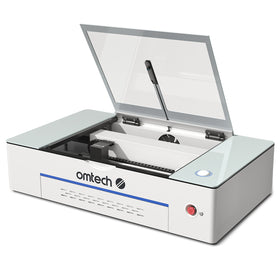
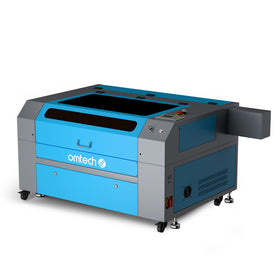
If you're looking for a CO2 laser that handles both materials well without breaking the budget, here are three OMTech machines worth considering, ranging from an entry-level desktop unit to a larger production-ready setup.
1. OMTech K40+ 45W Desktop CO2 Laser Engraver (£559)
The K40+Desktop Laser Cutter and Engraver is OMTech's most accessible CO2 laser, with a compact 8" x 12" working area and a detachable honeycomb workbed. At 45W, it clears the 40W+ threshold needed to cleanly cut and engrave acrylic, while also handling thin plywood, basswood, and other light woods with ease.
- Lowest-cost entry point into true CO2 laser cutting (not just engraving)
- Compact footprint suits home workshops and hobbyist desks
- Detachable honeycomb bed simplifies material changes between wood and acrylic projects
- Optional add-ons (rotary attachment, fume extractor, water chiller) let you scale the machine as your projects grow
2. OMTech Polar Lite 55W Desktop CO2 Laser Engraver (£1,900)
A step up in power and one of OMTech's best-selling desktop machines, the Polar Lite 55W Desktop Laser Engraver pairs a 55W CO2 tube with an all-in-one enclosed design. The extra wattage over the K40+ means faster cuts and cleaner edges on both cast acrylic and hardwoods.
- More power for thicker acrylic sheets and denser woods without slowing down
- Enclosed, all-in-one desktop design for safer indoor operation
- Popular for small business and craft use where consistent, repeatable results matter
- Available with LightBurn software bundled in, streamlining the acrylic vs. wood settings switch
3. OMTech Pronto 35S 60 60W CO2 Laser Cutter and Engraver (£2,399)
For makers outgrowing a small desktop bed, the Pronto 35S 60W CO2 laser engraver offers an extraordinary 1,000mm/s engraving speed and a large 700×500 mm working area with autofocus, making it easier to work with full acrylic sheets or larger wood panels in a single pass.
- Larger bed accommodates bigger signage, wall art, or batch production runs
- Autofocus removes the guesswork of manually adjusting focal height between acrylic and wood jobs
- 60W CO2 tube comfortably exceeds the acrylic power threshold while still being efficient on wood
- A practical middle ground between hobbyist desktop lasers and full industrial machines
All three are CO2-based, which (as mentioned above) is the deciding factor for working confidently across both materials, since diode lasers simply can't cut clear or light acrylic.
How to Choose Between Wood and Acrylic for Different Projects
The type of product you want to make dictates your choice between acrylic and wood, since the two materials differ fundamentally in structural properties, edge finishing, and hardware compatibility.
1. Mechanical Stress and Flexibility
- Wood handles structural tension much better; it flexes and wears nicely over time.
- Acrylic is highly brittle and can snap easily under stress.
Key takeaway: Don't use acrylic for high-friction mechanical parts or load-bearing items.
2. Post-Processing and Edge Finish
- Acrylic vaporizes and melts perfectly under a CO2 laser, leaving a beautiful, glossy, "flame-polished" edge that requires zero sanding or post-cut cleanup.
- Wood burns during cutting and leaves a charred, soot-covered brown or black edge.
Key takeaway: Wood requires more post-processing, usually manual sanding, masking, or staining to look finished.
3. Environmental and Outdoor Use
- Acrylic is completely waterproof, weather-resistant, and UV-stable, so it won't warp when exposed to moisture.
- Wood absorbs ambient moisture and humidity and is highly prone to warping or cracking outdoors.
Key takeaway: If you're laser cutting an item that will live outdoors and face the elements, acrylic is the better choice.
4. Hardware Limitations (Laser Type)
- CO2 lasers easily cut and engrave all woods and acrylics.
- Diode lasers struggle heavily with acrylic and can't cut clear, white, or light-colored acrylic at all.
Key takeaway: Sometimes your choice is limited by the kind of laser engraver you have on hand.

Best Laser Engraving Ideas: Acrylic vs. Wood
Best Laser Engraving Projects to Make With Acrylic
Acrylic is the go-to choice for a sleek, modern, industrial, or high-contrast aesthetic. For the best engraving contrast, choose cell cast acrylic over extruded plastic. Here are the top 4 laser cutting projects best suited to acrylic:
- LED edge-lit signs: Clear cast acrylic catches light perfectly, making engraved lines glow brightly when lit from the base.
- Cake toppers and food signage: Acrylic is non-porous and easily sanitized, making it completely food-safe.
- Modern jewelry: Neon, mirrored, and glitter acrylics are immensely popular for earrings, pins, and pendants.
- Outdoor storefront signage: Resists weather damage and color fading far better than unprotected wood.
Best Laser Engraving Projects to Make With Wood
Wood offers an organic, rustic texture and superior structural integrity. Popular laser-cutting choices include Baltic birch plywood, MDF, basswood, and walnut.
- Mechanical model kits and puzzles: Wood can handle the friction of interlocking snap-fit tabs without shattering.
- Living hinge boxes: Laser cutters can slice intricate slot lines into thin plywood, letting rigid wood bend fluidly like fabric.
- Engraved kitchenware: Products like cutting boards, serving trays, and wooden spoons showcase beautiful natural tonal shifts when engraved.
- Layered wall art: Multiple layers of stained plywood can be stacked together to build highly detailed 3D maps or mandalas.
Explore 17 more unique wood laser engraving ideas to unleash your creativity.
Best Laser Engraving Projects: For Acrylic vs. Wood
|
Material |
Best Laser Cutting Projects |
Key Advantages |
|
Acrylic |
LED edge-lit signs; cake toppers and food signage; modern jewelry; outdoor storefront signage |
Sleek, modern appearance; clear acrylic creates glowing effects; non-porous and easy to sanitize; available in mirrored, glitter, and neon finishes; excellent weather resistance |
|
Wood |
Mechanical model kits and puzzles; living hinge boxes; engraved kitchenware; layered wall art |
Natural, rustic appearance; strong structural integrity; excellent engraving contrast; easy to bend when precisely slotted; ideal for layered and 3D designs |
Final Thoughts Choosing Between Wood and Acrylic For Laser Engraving
The process of laser cutting wood and acrylic is largely the same, but the results, and the equipment you need to get there, are quite different. Acrylic rewards you with a glassy, professional edge and zero post-processing, but it's brittle, needs a CO2 laser, and costs more per sheet.
Wood is forgiving, structurally strong, and works with almost any laser you own, but it always needs some cleanup afterward. In most cases, the deciding factor comes down to two questions: does the project need to flex or bear weight (choose wood), and will it be shown off under light or live outdoors (choose acrylic)? Match the material to those demands first, and the right laser setup follows naturally.
You may also be interested in this complete guide on selecting the best materials for your laser engraver and many more projects you could explore with any laser engraver.