What Is Laser Cutting?
If there is a way to define what exactly laser cutting is, it is this: laser cutting is a manufacturing (and a hobbyist) process where high-energy light is concentrated into a focused beam, converting light into thermal energy to melt, burn, or vaporize different materials along a digital computer-controlled path.
The core concept of laser cutting is that concentrated light is used as a precise, non-contact thermal tool (instead of a physical blade), and it is used to cut different materials, achieving superior levels of precision and speed, and demanding much less manual labor.

How Laser Cutting Works: The Basics
- Thermal concentration: Thermal concentration is at the core of laser cutting: a massive amount of light energy is focused onto a tiny microscopic spot to rapidly boil or vaporize matter.
- Digital control: Similar to CNC machines, movement is dictated by vector paths (G-code) telling the laser head where to trace.
- Material interaction: The efficiency of laser cutting heavily depends on the type of material being cut. It is important to choose safe materials (like wood, acrylic, and PVC-free leather) because inappropriate substances like standard vinyl release toxic chlorine gas.
How Accurate Is Laser Cutting?
The accuracy of laser cutting typically ranges from ±0.05 mm to ±0.2 mm (roughly ±0.002 to ±0.008 inches) depending on the quality of your laser cutting/engraving machine. When it comes to laser cutting accuracy, it depends primarily on the type and capacity of the laser machine you use.
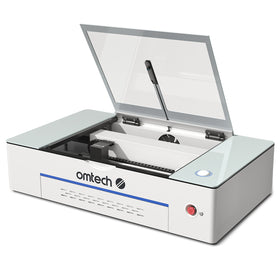
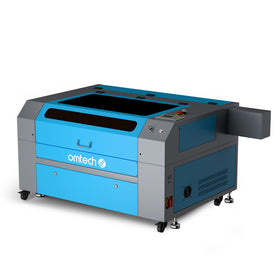
In general, professional and industrial-grade laser cutters like the OMTech Pronto Series laser engravers, which range from 60W to 150W, can be exceptionally precise, but for most entry- to mid-range laser cutting machines, the level of accuracy you can achieve depends on the type of material you are working with, how properly the machine is calibrated, and kerf (beam width) adjustments.

4 Key Factors That Determine Laser Cutting Accuracy
- The type of machine: The type of laser matters when it comes to laser cutting. In general, belt-driven hobby CO2 lasers usually achieve around 0.05 mm accuracy, but most industrial ACME screw-driven or high-end commercial laser engravers offer tighter tolerances. In general, the more sophisticated the machine, the more accurate it can cut.
- Your kerf width: The width of the laser beam burns away a small amount of material (typically 0.04 mm to 0.3 mm). So laser cutting accuracy also depends on how properly you can adjust your vector designs for this kerf to get tight interlocking parts.
- The material you are working with: The material you are cutting also affects the accuracy of laser cutting: some materials (like cast acrylic) have varying levels of thickness, even across a single sheet, which can throw off precision fitting.
- Focus and beam angle: Some materials are thicker, and they tend to experience a slight cutting angle taper from top to bottom depending on your lens focal length. Longer focal lenses (like a 4-inch lens) change the depth of field and can minimize taper on thick items.
Best and Worst Materials For Accurate Laser Cutting
If you value accuracy in laser cutting, it is very important to understand that different laser cutting materials react uniquely to the heat of a laser beam, which directly affects the precision, edge quality, and dimensional tolerance of the final cut. Here are some of the best materials for laser cutting:
1. Polymers and Plastics (e.g., Acrylic, Polycarbonate)
- Acrylic absorbs laser energy exceptionally well. It vaporizes cleanly, leaving a highly predictable, repeatable kerf (cut width).
- Plastics like polystyrene melt easily. Excess heat can cause the edges to pool or re-weld, which distorts fine details and ruins dimensions.
- Materials like PVC release toxic chlorine gas and acids when cut. This corrodes the machine's precision rails and optics, permanently degrading overall accuracy over time.
2. Woods and Organics (e.g., Plywood, MDF, Hardwood)
- Natural wood has alternating rings of soft and hard grain. The laser cuts faster through soft areas and slower through hard knots, leading to slight microscopic waviness along the cut line.
- Plywood contains layers of resin and glue. These adhesive pockets require more energy to burn through, which can cause localized charring and unpredictable widening of the cut.
- Medium-Density Fiberboard (MDF) lacks natural grain. Because it is highly uniform, it yields much more mathematically accurate and consistent cuts than natural wood, though it requires tightly controlled ventilation.
3. Metals (e.g., Steel, Aluminum, Copper)
- Metals like aluminum and copper rapidly pull heat away from the cutting zone. This requires massive, concentrated power. The surrounding heat can cause thermal expansion, warping the sheet mid-cut and misaligning features.
- Highly reflective metals bounce the laser beam away initially. This delays the initial breakthrough (piercing) and can cause irregular, jagged starting holes.
- Melted metal that fails to blow away adheres to the bottom edge as dross. Removing this hardened dross often requires sanding or grinding, which can accidentally alter the finished part's dimensions.

What Are The Advantages Of Laser Cutting?
The best way to highlight the advantages of laser cutting is to compare it with traditional cutting methods. That is because many distinct advantages make laser cutting a preferred method over traditional tools like CNC routers, plasma cutters, or waterjets. Consider the following advantages of laser cutting:
1. It Achieves High Precision and Intricate Detail
- Laser cutting can hold tight tolerances: Lasers can routinely hold tolerances within ±0.1 mm. This is a crucial advantage because it allows for incredibly tight press-fit joints and mechanical assemblies.
- Laser cutting provides micro-details: Because the laser beam focuses down to a fraction of a millimeter, it can cut sharp interior corners and intricate, lace-like patterns that are physically impossible for a spinning CNC router bit.
2. It Maximizes Speed and Production Efficiency
- Laser cutting is ideal for rapid prototyping: With laser cutting, you can go incredibly fast from an idea in Inkscape or CAD to a physical part in hand. It is incredibly fast, which makes it ideal for fast-paced design iterations.
- Laser cutting does not wear down your tools: Unlike mechanical bits that dull, chip, or break over time, a laser beam never wears out. This ensures the 1,000th cut is exactly as clean and accurate as the very first.
- There is very little waste with laser cutting: Advanced software allows you to "nest" shapes tightly together. The narrow cut width (kerf) means you can place parts almost touching, saving massive amounts of material.
There is Minimal Post-Processing (Clean Edges)
- Flame-Polished Edges: When cutting acrylic, the heat of a CO2 laser instantly vaporizes the plastic and melts the edge perfectly smooth, eliminating the need for manual sanding or polishing.
- No Fraying: On synthetic textiles and fabrics, the laser cauterizes the edge as it cuts, permanently preventing the fabric from unraveling.
- No Part Distortion: Because laser cutting is a non-contact process, there is no physical force pressing down on the material. You do not need complex clamps, and fragile or thin materials will not warp or shift mid-cut.
Unmatched Material Versatility
- One Machine, Many Jobs: A single standard CO2 laser can seamlessly transition from cutting thick plywood to etching glass, slicing leather, or marking anodized aluminum.
- Multi-Process Workflows: The same machine can handle vector cutting (slicing all the way through) and raster engraving (etching a shallow image or text onto the surface) in a single automated job run.

Why Does Air Assist Matter In Laser Cutting?
Air assist matters a lot more in laser cutting than laser engraving. Air assist changes the laser cutting quality by blowing a pressurized stream of gas directly into the cutting path to clear away molten debris, cool the material, and shield the optics. Without air assist, clean and consistent laser cutting is impossible to achieve: the laser beam would constantly re-heat trapped residue, causing severe burning, melting, or jagged edges.
4 Ways Air Assist Affects Laser Cutting Quality For Different Materials
- It prevents flaming and charring on organic materials like wood or leather. The high-pressure air keeps edges clean and tan rather than deeply charred or blackened.
- It eliminates bottom dross (slag): When cutting metal or plastic, the laser melts the material but cannot remove it. Air assist physically blasts the liquid pool out the bottom of the cut, preventing ugly, hardened droplets from bonding to the underside.
- It reduces the heat-affected zone (HAZ): The continuous blast of gas rapidly cools the area immediately surrounding the cut. This minimizes warping, prevents delicate details from melting together, and keeps the material's structural properties intact.
- It protects the focus lens: Air assist creates a positive pressure barrier pushing downward out of the nozzle. This stops smoke, vaporized resins, and flying sparks from rising into the cutting head and permanently fouling or cracking the costly focusing optics.
Using Different Gases for Air Assist: How It Affects Laser Cutting Quality
The choice of gas you use during laser cutting, and the amount of pressure it blows, can drastically change the final edge appearance of your laser cutting, the structural integrity of the material, and the amount of time you will have to spend cleaning up.
|
Gas Type |
Common Materials |
Primary Mechanism & Impact on Quality |
|
Compressed Air |
Wood, Acrylic, Leather, Thin Steel |
Mechanical: Cheap and effective for everyday hobby cutting. It blows away debris efficiently but contains oxygen, which causes mild discoloration or charring on wood and oxidized scaling on steel. |
|
Nitrogen (N₂) |
Stainless Steel, Aluminum, Plastics |
Inert Shielding: It does not react with the material. It creates a pristine, bright, oxide-free edge that is immediately ready for welding or painting without sanding. |
|
Oxygen (O₂) |
Carbon Steel, Thick Mild Steel |
Exothermic Reaction: The oxygen actively burns and adds chemical heat to the cut, allowing the laser to slice through thick metals much faster. However, it leaves a dark, brittle oxide layer on the cut edge. |
How To Balance Air Assist Pressure for Best Laser Cutting Results
- High Pressure: Essential for metals and dense materials to force heavy slag out of the deep kerf. However, setting the pressure too high on light materials like paper or thin veneers can cause the pieces to flutter, lift, and ruin the cut geometry.
- Low Pressure: Ideal for engraving wood or cutting delicate acrylics where high pressure might force molten plastic back onto the surface, creating a frosted, messy finish.
 Software For Laser Cutting: Which Software Do You Need For Laser Cutting?
You need at least three essential types of software for laser cutting: design software (to create the shapes), control software (to prepare the project for the machine), and proprietary vendor software bundled with specific hardware. These are the essential types of software you need to complete every step in the laser cutting process. Here are the most commonly used laser cutting software in each category and some options to consider:
1. Laser Control and CAM Software
This software converts your designs into instructions (G-code) that the machine understands. The most commonly used here are LightBurn, LaserGRBL, and RDWorks.
- LightBurn: The industry standard for hobbyists and professionals. It works with most CO2 and fiber lasers, manages layers, edits vectors, and controls speed and power.
- LaserGRBL: A free, open-source program designed specifically for budget diode lasers. It is simple but lacks advanced design tools.
- RDWorks: Free, older software often bundled with Chinese Ruida-controlled CO2 lasers. It has a steep learning curve but is highly functional.
2. Vector Design Software (CAD/Illustration)
Lasers require vector graphics (lines rather than pixels) to know exactly where to cut. Inkscape, Adobe Illustrator, and CorelDRAW are the most common options.
- Inkscape: A powerful, completely free, open-source vector editor used heavily in the laser community.
- Adobe Illustrator / CorelDRAW: Professional graphic design programs favored for clean vector layouts, typography, and complex patterns.
- AutoCAD / Fusion 360: Professional CAD software ideal for functional engineering parts requiring exact mechanical dimensions and tight tolerances.
Proprietary and Cloud Software
Many modern consumer laser brands lock you into their own ecosystems. These are supposed to provide features and functions that are specific to, and most compatible with, their machines.
- Glowforge Print: A cloud-based, drag-and-drop web app built specifically for Glowforge machines.
- xTool Creative Space (XCS): A beginner-friendly, free program optimized for xTool diode and CO2 lasers.
- Laserbox / Flux Studio: Dedicated apps built to streamline workflows for specific desktop laser brands.
So, when choosing software for laser cutting, the most important question is what brand or model of laser cutter you own, and what operating system you run. Based on the answer to these questions, you can decide which of the above software works best for you.
Using Inkscape For Laser Cutting: Essential Tips and Notes
Inkscape is highly capable for laser cutting. Many people in the laser cutting community use it as the best free, open-source alternative to expensive software like Adobe Illustrator or CorelDRAW. However, there are some vital tricks, workflows, and known quirks when using Inkscape for laser cutting:
Essential Tips for Inkscape Laser Design
- Set your line width to "Hairline": A common pro-tip is to change your path stroke style to "Hairline" or zero-width. If your vector lines have a visual width (like 1mm), Inkscape factors that into the object dimensions, which can throw off your real-world cutting precision.
- Color-code your paths: Laser control programs read vector colors to determine actions. Users suggest a standard palette: Red for cutting, Blue for scoring/vector engraving, and Black for raster fill engraving.
- Leverage path effects for kerf: Compensating for the laser beam width (kerf) is simple in Inkscape. Users recommend using the built-in Path → Path Effects → Offset tool to scale your edges outward or inward by fractions of a millimeter to ensure press-fit joints lock together perfectly.
- Utilize snapping and tiling: For multi-part projects or repeating shapes, turn on advanced snapping grids and use the Tiling tool to tightly pack parts together to save material.
Known Quirks and Limitations of Using Inkscape for Laser Cutting
- The "Direct Print" Issue: If your workshop uses high-end corporate lasers (like Epilog or Universal Laser Systems) that rely on a Windows print driver, Inkscape cannot always print directly to them. Reddit's universal workaround is to save your Inkscape file as a PDF, open it in Acrobat, and print to the laser from there.
- Clunkiness for Mechanical CAD: While excellent for artistic and 2D vector layouts, if you are designing complex, multi-part 3D objects with strict interlocking mechanical tolerances, dedicated CAD software (like Fusion 360 or Onshape) is faster and more accurate.

What Industries Use Laser Cutting?
Laser cutting is an essential, everyday tool that is used across a massive range of heavy industries, high-tech manufacturing, and specialized niche markets. The common approach to understanding which industries use laser cutting is to break it into a few primary sectors based on the type of laser cutting machine being used.
1. Sheet Metal and Heavy Fabrication (Fiber Lasers)
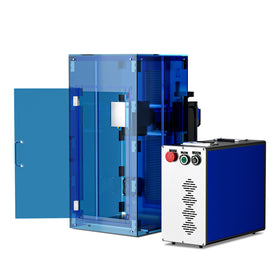
Massive, high-wattage industrial fiber laser engravers are used for laser cutting in the sheet metal and heavy fabrication industries. These systems fill the vital speed and detail gap between slow water-jets and massive stamping turrets.
- Automotive: Laser cutting is used to rapidly slice high-strength body panels, structural brackets, exhaust components, and even interior upholstery textiles.
- Aerospace and Defense: Laser cutting is used to slice highly sensitive or hardened materials like titanium, Inconel, and armored plating to exacting military or aerospace tolerances.
- Construction and Infrastructure: Laser cutting is used to mass-produce thousands of custom steel connection plates, base plates, and structural tube components for bridges, tunnels, and buildings.
2. Contract Manufacturing and B2B Job Shops
Laser cutting is also heavily used in contract manufacturing and B2B businesses. In fact, the most profitable commercial laser operations focus on B2B (business-to-business) contract manufacturing rather than selling consumer crafts.
- Job Shops: These facilities invest in expensive, high-end industrial laser cutters to provide outsourced parts for companies that cannot justify the massive capital overhead of owning a laser.
- Prototyping and R&D: Product designers use lasers to quickly iterate parts out of acrylic, sheet metal, or MDF before committing to expensive injection molding tools.
3. High-Precision and Technical Fields
Because lasers can cut without physically touching (and potentially distorting) a delicate part, they are critical for micro-manufacturing.
- Medical Devices: Laser cutting is used to fabricate fragile, complex, micro-scale medical tools like surgical scalpels, vascular stents, catheters, and internal diagnostic housing units.
- Electronics: Laser cutting is used for cleanly profiling printed circuit boards (PCBs), cutting custom solder stencils, and trimming thin insulating plastics used inside electronics enclosures.
4. Commercial Display, Signage, and Textiles
This sector relies heavily on mid-to-high range CO2 lasers to deal with non-metal substrates.
- Advertising and Sign Making: Laser cutting is used for slicing pristine, flame-polished acrylic lettering, dimensional wood signs, and complex corporate logos.
- Fashion and Textile Industry: Automated roll-fed lasers cut intricate garment patterns, etch leather goods (like bags and patches), and instantly cauterize synthetic fabric edges to prevent fraying.
5. Specialized Arts and Architecture
- Set and Stage Design: Laser cutting helps rapidly build scale architectural models, theatrical props, and intricate exhibition displays out of foam, wood, and acrylic.
- Musical Instruments: Laser cutting is used for slicing acoustic guitar panels, violin components, and wind instrument elements to highly precise geometric layouts to protect sound quality.
What are the Best Woods For Laser Cutting?
Baltic Birch plywood (3mm or 1/8") is generally considered to be the best overall wood for general laser cutting and structural prototyping due to its high strength, consistency, and affordability. However, depending on your budget and the kind of laser cutter you have, basswood plywood and MDF can also be good for laser cutting.
- Baltic Birch plywood (3mm or 1/8"): Unlike standard big-box store plywood, authentic Baltic Birch features multiple uniform layers of solid birch with minimal internal voids or heavy knots that block the laser beam.
- Basswood Plywood (Best for Low-Powered/Diode Lasers): Basswood is an incredibly soft, lightweight wood. If you are using a budget or lower-wattage diode laser, basswood offers very little resistance and cuts with a clean, low-char edge.
- MDF and HDF Core (Best for Paint Fill and Mechanical Flatness): While it lacks a natural wood look, MDF cuts predictably because it has no wood grain. Engineered options like TruFlat Laser Wood (available at retailers like MakerFlo) use an HDF core that is guaranteed to stay completely flat on the laser bed.

Where to Buy Wood For Laser Cutting in the UK/US
The best places to buy laser-ready wood are usually specialized online lumber suppliers, specialty hardwood dealers, and local professional lumber yards. For laser cutting especially, it is never a good idea to buy standard craft wood from generic marketplaces. Always go for dedicated vendors who understand laser-safe glues and warping.
1. Dedicated Online Wood Suppliers (Highly Recommended)
These vendors are the community favorites because their inventory is explicitly dried, dimensioned, and cut to fit standard laser beds.
- Ocooch Hardwoods: This is the most frequently recommended supplier online. They sell a massive variety of solid, "project-ready" thin hardwoods (like Cherry, Walnut, and Maple) in thicknesses down to 1/16" and 1/8" that cut beautifully.
- Smoky Hill Laser Designs: Widely praised for high-quality MDF-core patterned boards, veneers, and Baltic Birch ply. They are run by active community members and offer a heavily discounted "misfit" section for practice material.
- MakerStock: A staple for purchasing pre-cut, flat panels of authentic Baltic Birch Plywood Sheets built explicitly for CNC and laser machining.
2. Commercial Sign and Supplier Catalogs
If you are running a business or buying in bulk, Redditors suggest sourcing from commercial supply houses.
- Johnson Plastics Plus (JPP): Don't let the name fool you; JPP is heavily utilized by many people for premium, laserable ply, MDF, and double-sided wood sheets with consistent tolerances.
- MakerFlo TruFlat Laser Wood: Highly rated for bulk orders, selling case packs of pre-finished, completely flat engineered wood that bypass the need for surface masking or extensive sanding.
3. Local Industrial and Trade Alternatives (Cheapest Bulk)
To bypass heavy shipping costs, you can try buying local and cutting down the material yourself.
- Local hardwood lumber yards: Use search terms like "hardwood supplier near me" or "cabinetmaker supply" rather than looking for big-box retailers. Ask them for interior-grade (M1 glue) 5x5 sheets of Baltic Birch or thin MDF.
- Cabinet Shop Suppliers: Many commercial cabinet suppliers will sell excess thin sheets or veneers directly to the public at wholesale cost if you pick it up in a truck.
Getting Started With Laser Cutting
Laser cutting rewards a little upfront planning far more than most tools do. Once you understand how accuracy, kerf, air assist, and material choice all interact, dialing in a clean, repeatable cut becomes a matter of matching the right settings and the right material to the job in front of you— not trial and error.
Whether you're prototyping a mechanical part in acrylic, running a sheet metal production line, or cutting your first Baltic Birch box design in Inkscape, the fundamentals covered here carry through every project: choose laser-safe materials, respect your machine's kerf and tolerances, and don't skip air assist. Get those right, and everything else about laser cutting becomes far more predictable.
You may also be interested in these amazing resin techniques for laser-cut projects.