The Best Laser Engraver for Beginners
Finding the Best Beginner Laser Engraver
Equal parts artistic and technical, laser engraving places incredible creative powers at your fingertips. The endless possibilities of using a thin but potent laser beam to engrave custom artwork on popular products are justifiably captivating. Laser engraving dates as far back as the computer you’re reading this on. Nowadays, lasers are fast becoming the innovative method for marking and engraving rather than traditional techniques. For laser engraving to take place, a laser beam hits the surface of a material and vaporizes the top layer of the surface while adding the intended design with a great contrast.
As simple as the process sounds, laser engraving for beginners could go all wrong without the best beginner laser cutter. In fact, the best laser engraver for beginners should be user-friendly and easy to use with a simple structure and design. As a beginner, you would find that many entry-level laser engraving machines exist in the market with varying prices and capabilities. During your search, you may also have come across the term Chinese laser, which refers to laser machines made in China. With some stigmas surrounding the name, these machines can actually be the best starter laser cutter for beginners. In this article, we’ll summarize all you need to know to choose the best beginner laser cutter and engraver.
Starting out with a K40 Desktop Laser Engraver
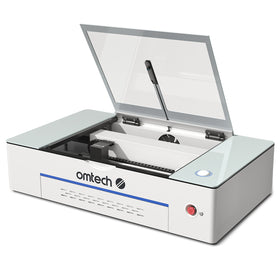
K40 laser engravers are generally considered the most affordable and best laser engraver for beginners who have no prior experience handling a laser machine. K40 laser engravers are consistently the best-selling laser machines for home hobbyists and small businesses. This desktop laser engraving machine is known for its ease of accessibility and versatility in addition to its portability. These three factors mentioned earlier are very important features of a laser engraving machine for beginners. Its comprehensive user manual contains all information right from the point where you assemble the parts of your machine to where you fix minor issues that might come up while running the machine. OMTech, a laser company based in Anaheim, California, offers their popular 40W desktop laser engraver that produces flawless engravings and cuts up to 1/8” thick plywood and acrylic. This is one of the best laser engravers for beginners that would be easy to use and produce great results, yet remain affordable.

What is the best laser engraver for beginners?
Although the K40 desktop model is one of the best starter laser cutters for beginners, many users have recently voiced that they would have preferred a more powerful engraving machine with a larger workspace. Specifically, many wished they would have invested in a Mid-Range laser engraver of 50W or more. For some beginners, it comes down to the FOMO on having more power and space when choosing your first laser! Many others find that the extra power and workspace would have been critical to offering professional services. The reason for these preferences cannot be far-fetched as the Mid-Range laser engraver has even more professional advantages that could speed up your job and still produce great results while making your beginner experience fun.
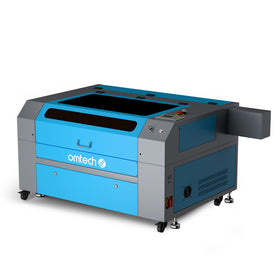
The Mid-Range laser engraver is known for its efficient engraving speeds and considerable cutting capabilities. For OMTech’s Mid-Range series, the power ranges from 50W to 80W, and can effectively cut through 6 mm to 9 mm (.25" to .35") thick plywood and acrylic.
Here are some of the features that makes the Mid-Range (50W+) the best laser engraver for beginners:
Larger workspace
As a beginner in the world of laser engraving, having a larger working space means more convenience while working as you have more room to take on large workpieces. The OMTech MF1220-50 has a 11.5” x 19.5” (295 x 495mm) engraving/cutting area to tackle large-scale projects with ease. There’s enough space to see what you are doing and to place laser engraving accessories like laser rotary attachments in the workbed. These capabilities are critical to offering a wide range of professional services. So, if you have professional aspirations to start a small laser engraving business, consider a mid-range machine as the best laser engraver for beginners.
Higher power
Lower-wattage laser engravers have a hard time processing thicker and more dense materials, whereas a higher-powered system can finish the task quickly and efficiently. OMTech’s Mid-Range laser engraving machine has a higher wattage laser tube with greater cutting ability and longer laser tube lifetime. With an integrated power supply that features increased response speed, performance, and cutting power - it’s beaming with possibilities! Plus, depending on which wattage you choose, you’ll be able to cut between 6 mm (1/4″) and 9 mm (⅓”) thick acrylic and softwoods.
Better Control Interface
Laser engraving for beginners can be tough to learn. That’s why it’s imperative to choose a user-friendly machine. One of the distinctive features you would find on the mid-range series is the Ruida digital controller. It is an intuitive control panel with a digital display that allows complete control of the laser head, pausing and stopping projects, adjusting laser power and speed settings. Some other features include air-assist, adjustable laser nozzle, built-in ventilation and the red dot guidance. The Ruida controller is easy to use and it’s widely trusted by laser engraving veterans and small businesses throughout the laser community. Surely, this again qualifies the mid-range as the best laser engraver for beginners and best beginner laser cutter.

Safety Tips for Beginner Laser Engravers
Laser engraving is an exciting and rewarding skill to learn, but safety should always come first—especially for beginners. Understanding a few essential safety practices will help you protect yourself, your workspace, and your equipment while achieving consistent results.
1. Ensure Proper Ventilation
Laser engraving produces smoke, fumes, and fine particles, particularly when working with wood, acrylic, leather, or coated materials. Always use an effective exhaust system or place your machine near a window with proper ducting. Good ventilation not only improves air quality but also helps keep optics and components cleaner over time.
2. Wear Appropriate Eye Protection
Even enclosed laser engravers can emit reflected laser light. Wearing laser safety glasses designed for your machine’s wavelength adds an extra layer of protection, especially during setup, testing, or when the enclosure is open.
3. Never Leave the Machine Unattended
Laser engravers generate heat and can pose a fire risk if materials ignite. Beginners should always stay nearby while the machine is running and keep a fire extinguisher within reach. A few seconds of attention can prevent costly damage or accidents.
4. Choose Safe Materials Only
Not all materials are suitable for laser engraving. Certain plastics and treated materials can release toxic fumes when burned. Before engraving a new material, confirm that it is laser-safe and avoid unknown or unverified materials altogether.
5. Keep Your Workspace Clean
A tidy work area reduces fire hazards and improves engraving consistency. Regularly remove debris from the machine bed, clean residue from previous jobs, and ensure airflow paths are not blocked.
6. Follow Basic Maintenance and Setup Guidelines
Proper alignment, clean lenses, and correct focus settings help ensure smooth operation and reduce unnecessary strain on the machine. Beginners who follow routine maintenance steps often experience fewer issues and better engraving quality from the start.
Conclusion
With all said and done about the qualities of the best laser engraver for beginners, it is clear that you can never go wrong by buying a bigger machine. This is especially true when you have future plans to go pro with the laser engraving business. As you start your journey, the right laser engraving machine would help you grow and hone your skill on your way to the top. In essence, do not purchase a laser engraver with only the present in mind, bear in mind the possibility of someday turning your passion into profit. OMTech manufactures quality laser machines with top-notch features and value for money spent. As you launch your business with OMTech, reach out to them for all you need to get started on the right track.
Frequently Asked Questions
What is the best laser engraver for beginners?
The best laser engraver for beginners is one that is easy to set up, safe to use, and versatile enough for common materials like wood, acrylic, leather, and rubber. Entry-level CO₂ laser engraving machines are often recommended because they balance performance, affordability, and user-friendly operation.
Is a laser engraver the same as a laser cutting machine?
Not exactly. A laser engraver is designed primarily for marking and engraving surfaces, while a laser cutting machine is optimised for cutting through materials. However, many modern laser engraving machines can both engrave and cut, making them ideal for beginners and small workshops.
What materials can beginners work with using a laser engraving machine?
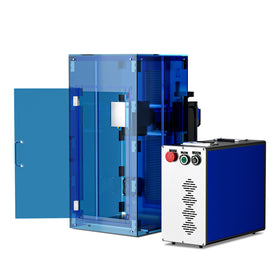
Beginners can comfortably work with wood, MDF, acrylic, leather, paper, and rubber. CO₂ laser machines are especially popular for these materials, while fibre lasers are more suitable for engraving bare metals.
Are laser engravers suitable for small businesses?
Yes. Many beginners start with a laser engraver and quickly turn it into a profitable tool. Compact machines are often considered the best laser cutter for small business use, as they support custom products, signage, gifts, and light production without requiring industrial space.
How much maintenance does a beginner laser engraver require?
Basic maintenance includes cleaning lenses and mirrors, checking alignment, ensuring proper ventilation, and monitoring cooling systems. Beginner-friendly laser engraving machines are designed to keep maintenance simple and manageable.
Is it difficult to learn laser engraving?
Not at all. With intuitive software and plenty of tutorials available, most beginners can start engraving within a few hours. Learning curves are generally gentle, especially with modern laser engravers designed for first-time users.